CleanBrowsing | Remote | Contract, Maybe full time
CleanBrowsing is building a safe, fast & easy to use DNS-based parental control solution for families, parents and schools. We already offer a free Anycast DNS available on our site: https://cleanbrowsing.org and we are expanding it.
Looking to fill one position right now:
* Windows developer (to build Windows apps)
We don't have a career page up yet, but if interested, email us at cleanbrowsing@noc.org so we can chat.
Some parents don't realize that after certain age, you have to start treating teens are pre-adults and not kids anymore. This depends on the kids maturity, but is generally around 13, 14 or 15.
It is not about do as I say, but do as I do. Lead by example and not by strength.
I build parenting-control systems (via DNS) and I often see parents trying to force it on older kids (and even college students) to try to control them. My response is that strict restrictions only work for younger kids that are not mature enough to make good decisions. As they get older, they will find a way to bypass them and will hate their parents for it.
I don't blame them as they generally want the best for their kids. Being a parent is not easy.
CleanBrowsing | Remote | Contract, Maybe full time
CleanBrowsing is building a safe, fast & easy to use DNS-based parental control solution for families, parents and schools. We already offer a free Anycast DNS available on our site: https://cleanbrowsing.org and we are expanding it.
Looking to fill a few positions:
  * PHP Frontend developer
  * Frontend designer (HTML, CSS - PHP a plus)
  * C developer
We don't have a career page up yet, but if interested, email us at cleanbrowsing@noc.org so we can chat.
  $ sh ./dnstest.sh |sort -k 22 -n
               test1   test2   test3   test4   test5   test6   test7   test8   test9   test10  Average
  cloudflare     1 ms    1 ms    1 ms    4 ms    1 ms    1 ms    1 ms    1 ms    1 ms    1 ms      1.30
  norton         2 ms    2 ms    2 ms    2 ms    2 ms    2 ms    2 ms    2 ms    2 ms    2 ms      2.00
  neustar        2 ms    2 ms    2 ms    2 ms    1 ms    2 ms    2 ms    2 ms    2 ms    22 ms     3.90
  cleanbrowsing  11 ms   23 ms   11 ms   11 ms   11 ms   11 ms   11 ms   13 ms   12 ms   11 ms     12.50
  google         4 ms    4 ms    3 ms    21 ms   21 ms   61 ms   3 ms    21 ms   21 ms   22 ms     18.10
  opendns        2 ms    2 ms    2 ms    39 ms   2 ms    75 ms   2 ms    21 ms   39 ms   13 ms     19.70
  comodo         22 ms   23 ms   22 ms   22 ms   22 ms   22 ms   22 ms   22 ms   22 ms   23 ms     22.20
  quad9          10 ms   37 ms   10 ms   10 ms   10 ms   145 ms  10 ms   10 ms   10 ms   20 ms     27.20
  yandex         177 ms  216 ms  178 ms  182 ms  186 ms  177 ms  183 ms  174 ms  186 ms  222 ms    188.10
  adguard        199 ms  210 ms  200 ms  201 ms  202 ms  202 ms  199 ms  200 ms  198 ms  201 ms    201.20
                  test1   test2   test3   test4   test5   test6   test7   test8   test9   test10  Average
    cloudflare2nd  94 ms   81 ms   81 ms   79 ms   97 ms   90 ms   85 ms   89 ms   84 ms   78 ms     85.80
    cloudflare     74 ms   316 ms  69 ms   83 ms   77 ms   69 ms   85 ms   69 ms   82 ms   74 ms     99.80
    neustar        98 ms   100 ms  99 ms   102 ms  107 ms  113 ms  113 ms  112 ms  106 ms  100 ms    105.00
    adguard        154 ms  133 ms  133 ms  91 ms   94 ms   133 ms  96 ms   95 ms   98 ms   99 ms     112.60
    norton         132 ms  138 ms  117 ms  118 ms  131 ms  147 ms  133 ms  143 ms  141 ms  141 ms    134.10
    cleanbrowsing  154 ms  142 ms  140 ms  137 ms  155 ms  178 ms  158 ms  115 ms  77 ms   111 ms    136.70
    quad9          187 ms  170 ms  168 ms  154 ms  156 ms  156 ms  165 ms  164 ms  170 ms  174 ms    166.40
    opendns        258 ms  128 ms  121 ms  135 ms  125 ms  317 ms  124 ms  266 ms  131 ms  119 ms    172.40
    google         148 ms  264 ms  153 ms  137 ms  225 ms  274 ms  74 ms   258 ms  136 ms  279 ms    194.80
    google2nd      149 ms  284 ms  159 ms  223 ms  257 ms  412 ms  125 ms  254 ms  134 ms  268 ms    226.50
    comodo         273 ms  290 ms  303 ms  286 ms  308 ms  280 ms  314 ms  302 ms  263 ms  299 ms    291.80
    yandex         511 ms  567 ms  482 ms  442 ms  516 ms  443 ms  477 ms  471 ms  449 ms  454 ms    481.20
Are you using Telstra by chance? They have the worst routing I've ever seen. I've had huge problems getting good routes for their customers. I've had better luck with "IInet" customers.
I would be curious to see what the ping ms is for status.neocities.org, ideally it's coming from Sydney and not the states.
Not sure, actually! I'm just staying with someone at the moment. They're coincidentally changing broadband provider to this tomorrow - https://node1.com.au/
    test1   test2   test3   test4   test5   test6   test7   test8   test9   test10  Average
    cloudflare2nd  9 ms    9 ms    10 ms   9 ms    9 ms    9 ms    9 ms    9 ms    9 ms    9 ms      9.10
    cloudflare     9 ms    9 ms    9 ms    10 ms   9 ms    10 ms   10 ms   9 ms    9 ms    9 ms      9.30
    google2nd      16 ms   14 ms   8 ms    17 ms   21 ms   9 ms    9 ms    23 ms   14 ms   14 ms     14.50
    google         32 ms   10 ms   9 ms    16 ms   14 ms   22 ms   9 ms    22 ms   15 ms   14 ms     16.30
    quad9          17 ms   18 ms   18 ms   19 ms   17 ms   18 ms   18 ms   17 ms   18 ms   19 ms     17.90
    cleanbrowsing  19 ms   18 ms   18 ms   18 ms   18 ms   18 ms   18 ms   18 ms   18 ms   19 ms     18.20
    opendns        8 ms    9 ms    9 ms    9 ms    24 ms   109 ms  9 ms    9 ms    8 ms    8 ms      20.20
    comodo         23 ms   22 ms   22 ms   22 ms   23 ms   22 ms   22 ms   23 ms   22 ms   23 ms     22.40
    neustar        25 ms   25 ms   25 ms   26 ms   24 ms   25 ms   25 ms   27 ms   25 ms   25 ms     25.20
    norton         25 ms   26 ms   25 ms   35 ms   25 ms   25 ms   25 ms   26 ms   25 ms   26 ms     26.30
    yandex         101 ms  91 ms   54 ms   46 ms   54 ms   72 ms   54 ms   45 ms   47 ms   55 ms     61.90
    adguard        63 ms   239 ms  71 ms   65 ms   73 ms   63 ms   66 ms   60 ms   58 ms   58 ms     81.60
Results for Yandex and AdGuard do vary a lot between runs, but are consistently worse than all the others.
                 test1   test2   test3   test4   test5   test6   test7   test8   test9   test10  Average
  neustar        2 ms    2 ms    3 ms    3 ms    3 ms    2 ms    2 ms    2 ms    3 ms    3 ms      2.50
  norton         2 ms    3 ms    3 ms    3 ms    3 ms    3 ms    3 ms    3 ms    2 ms    3 ms      2.80
  quad9          3 ms    3 ms    3 ms    3 ms    3 ms    2 ms    3 ms    2 ms    3 ms    3 ms      2.80
  cloudflare     2 ms    3 ms    3 ms    4 ms    3 ms    4 ms    3 ms    2 ms    3 ms    2 ms      2.90
  cloudflare2nd  3 ms    3 ms    3 ms    3 ms    3 ms    3 ms    3 ms    3 ms    4 ms    3 ms      3.10
  google2nd      2 ms    2 ms    2 ms    5 ms    14 ms   3 ms    2 ms    6 ms    3 ms    2 ms      4.10
  google         2 ms    2 ms    2 ms    5 ms    6 ms    200 ms  3 ms    5 ms    2 ms    2 ms      22.90
  opendns        3 ms    2 ms    2 ms    191 ms  3 ms    272 ms  2 ms    3 ms    2 ms    3 ms      48.30
  cleanbrowsing  177 ms  177 ms  178 ms  178 ms  178 ms  177 ms  177 ms  177 ms  176 ms  177 ms    177.20
  adguard        185 ms  186 ms  185 ms  185 ms  194 ms  185 ms  186 ms  185 ms  185 ms  185 ms    186.10
  yandex         255 ms  248 ms  282 ms  281 ms  224 ms  201 ms  213 ms  285 ms  213 ms  215 ms    241.70
  comodo         262 ms  262 ms  263 ms  263 ms  272 ms  261 ms  262 ms  262 ms  261 ms  262 ms    263.00
Made a couple of changes to add median value and local DNS (via ViewQuest).
  ./dnstest.sh| column -s\, -t
  DNS            test1   test2   test3   test4   test5   test6   test7   test8   test9   test10  Average    Median
  cloudflare     3 ms    3 ms    3 ms    3 ms    3 ms    3 ms    3 ms    4 ms    3 ms    3 ms    3.10 ms    3 ms
  cloudflare2nd  3 ms    3 ms    3 ms    3 ms    3 ms    3 ms    3 ms    3 ms    3 ms    3 ms    3.00 ms    3 ms
  google         4 ms    3 ms    2 ms    3 ms    4 ms    3 ms    2 ms    6 ms    2 ms    4 ms    3.30 ms    3 ms
  google2nd      2 ms    2 ms    2 ms    2 ms    6 ms    201 ms  2 ms    4 ms    2 ms    2 ms    22.50 ms   2 ms
  quad9          5 ms    4 ms    4 ms    3 ms    3 ms    3 ms    3 ms    2 ms    2 ms    4 ms    3.30 ms    3 ms
  opendns        2 ms    2 ms    2 ms    5 ms    3 ms    236 ms  2 ms    54 ms   2 ms    2 ms    31.00 ms   2 ms
  norton         3 ms    3 ms    3 ms    4 ms    3 ms    3 ms    3 ms    3 ms    3 ms    3 ms    3.10 ms    3 ms
  cleanbrowsing  178 ms  179 ms  178 ms  182 ms  176 ms  178 ms  177 ms  177 ms  177 ms  177 ms  177.90 ms  178 ms
  yandex         200 ms  319 ms  281 ms  213 ms  293 ms  215 ms  281 ms  287 ms  281 ms  215 ms  258.50 ms  281 ms
  adguard        185 ms  189 ms  185 ms  186 ms  186 ms  185 ms  186 ms  186 ms  186 ms  186 ms  186.00 ms  186 ms
  neustar        3 ms    3 ms    3 ms    3 ms    2 ms    2 ms    3 ms    3 ms    3 ms    3 ms    2.80 ms    3 ms
  comodo         271 ms  262 ms  263 ms  265 ms  290 ms  264 ms  262 ms  266 ms  263 ms  262 ms  266.80 ms  264 ms
  local          0 ms    6 ms    3 ms    1 ms    0 ms    0 ms    0 ms    0 ms    0 ms    0 ms    1.00 ms    0 ms
For DNS performance the average is probably not the correct measurement stick. It's vulnerable to sudden spikes or timeouts which happen a lot in UDP traffic.
I recommend measuring the median and p0.5, p99.5 and maybe p99.99 values with a lot of data points. That eliminates any packet issues and laves you with the performance you can expect for 50%, 0.5%, 99.5% and 99.99% of your DNS traffic.
                      test1   test2   test3   test4   test5   test6   test7   test8   test9   test10  Average
    10.2.129.10       21 ms   1000 ms 1000 ms 25 ms   1000 ms 1000 ms 27 ms   1000 ms 28 ms   1000 ms   610.10
    10.2.129.11       28 ms   26 ms   25 ms   25 ms   82 ms   31 ms   24 ms   28 ms   24 ms   26 ms     31.90
    cloudflare        26 ms   25 ms   26 ms   24 ms   26 ms   25 ms   24 ms   24 ms   25 ms   25 ms     25.00
    google            25 ms   25 ms   25 ms   27 ms   81 ms   25 ms   24 ms   26 ms   24 ms   24 ms     30.60
    quad9             158 ms  160 ms  156 ms  158 ms  157 ms  158 ms  163 ms  159 ms  159 ms  160 ms    158.80
    opendns           149 ms  32 ms   32 ms   269 ms  34 ms   232 ms  32 ms   152 ms  87 ms   34 ms     105.30
    norton            156 ms  152 ms  163 ms  156 ms  174 ms  158 ms  157 ms  163 ms  161 ms  163 ms    160.30
    cleanbrowsing     32 ms   36 ms   34 ms   35 ms   33 ms   31 ms   33 ms   156 ms  33 ms   37 ms     46.00
    yandex            271 ms  283 ms  297 ms  288 ms  287 ms  302 ms  277 ms  295 ms  294 ms  296 ms    289.00
    adguard           291 ms  290 ms  290 ms  294 ms  285 ms  288 ms  287 ms  297 ms  284 ms  294 ms    290.00
    neustar           160 ms  150 ms  164 ms  161 ms  159 ms  156 ms  159 ms  159 ms  156 ms  159 ms    158.30
    comodo            169 ms  170 ms  171 ms  162 ms  166 ms  161 ms  169 ms  162 ms  165 ms  166 ms    166.10
thanks for the script, I added my isp (spectrum) and my own server (localbind)
Central Ohio
                    test1   test2   test3   test4   test5   test6   test7   test8   test9   test10  Average
  localbind         1 ms    1 ms    1 ms    1 ms    1 ms    1 ms    1 ms    1 ms    1 ms    1 ms      1.00
  norton            34 ms   34 ms   33 ms   34 ms   33 ms   34 ms   34 ms   34 ms   34 ms   34 ms     33.80
  cloudflare        35 ms   33 ms   34 ms   33 ms   34 ms   34 ms   36 ms   33 ms   34 ms   33 ms     33.90
  neustar           36 ms   34 ms   35 ms   33 ms   34 ms   34 ms   34 ms   34 ms   35 ms   33 ms     34.20
  spectrum          37 ms   37 ms   36 ms   36 ms   36 ms   36 ms   35 ms   36 ms   35 ms   47 ms     37.10
  opendns           33 ms   33 ms   33 ms   54 ms   33 ms   33 ms   33 ms   45 ms   41 ms   34 ms     37.20
  127.0.1.1         2 ms    36 ms   77 ms   3 ms    118 ms  2 ms    2 ms    80 ms   2 ms    71 ms     39.30
  google            34 ms   33 ms   35 ms   44 ms   51 ms   51 ms   33 ms   44 ms   33 ms   44 ms     40.20
  comodo            43 ms   41 ms   42 ms   42 ms   41 ms   41 ms   41 ms   41 ms   41 ms   41 ms     41.40
  cleanbrowsing     48 ms   48 ms   133 ms  48 ms   45 ms   46 ms   45 ms   48 ms   48 ms   61 ms     57.00
  quad9             88 ms   87 ms   90 ms   89 ms   89 ms   88 ms   90 ms   90 ms   88 ms   93 ms     89.20
  yandex            149 ms  176 ms  152 ms  148 ms  149 ms  155 ms  149 ms  161 ms  155 ms  201 ms    159.50
  adguard           158 ms  202 ms  157 ms  165 ms  161 ms  156 ms  155 ms  158 ms  155 ms  155 ms    162.20
To be fair, every single time I install an emacs or vim plugin, npm lib, ruby gem, pip package, or anything close, so do I.
Really the only code I audit is a 2 page script on HN because I feel someone might judge me if I don't. But even then, I sort of gave up after the first page.
Computer security is so fubar, it's not even funny.
I used to teach people not to pipe curl to bash. Now I just add sudo -n tests to my scripts and see if they have passwordless sudo. It turns out, a lot of people have passwordless sudo.
    cloudflare     32 ms   33 ms   34 ms   39 ms   36 ms   35 ms   29 ms   57 ms   48 ms   33 ms     37.60
    google         43 ms   38 ms   37 ms   60 ms   34 ms   30 ms   30 ms   50 ms   32 ms   67 ms     42.10
    quad9          30 ms   139 ms  25 ms   35 ms   49 ms   36 ms   34 ms   32 ms   27 ms   47 ms     45.40
    opendns        32 ms   33 ms   28 ms   69 ms   32 ms   91 ms   37 ms   75 ms   67 ms   39 ms     50.30
    norton         35 ms   33 ms   33 ms   31 ms   39 ms   34 ms   22 ms   25 ms   24 ms   33 ms     30.90
    cleanbrowsing  36 ms   48 ms   40 ms   49 ms   56 ms   35 ms   36 ms   49 ms   49 ms   46 ms     44.40
    yandex         217 ms  233 ms  203 ms  199 ms  215 ms  380 ms  210 ms  204 ms  258 ms  205 ms    232.40
    adguard        98 ms   95 ms   101 ms  97 ms   104 ms  129 ms  103 ms  110 ms  95 ms   111 ms    104.30
    neustar        32 ms   30 ms   32 ms   35 ms   31 ms   34 ms   29 ms   28 ms   138 ms  34 ms     42.30
    comodo         55 ms   52 ms   51 ms   52 ms   47 ms   48 ms   58 ms   59 ms   48 ms   48 ms     51.80
Run it with "sort -k 22 -n" to to get it listed in order of performance:
*norton is faster for you:
    norton         35 ms   33 ms   33 ms   31 ms   39 ms   34 ms   22 ms   25 ms   24 ms   33 ms     30.90
    cloudflare     32 ms   33 ms   34 ms   39 ms   36 ms   35 ms   29 ms   57 ms   48 ms   33 ms     37.60
    google         43 ms   38 ms   37 ms   60 ms   34 ms   30 ms   30 ms   50 ms   32 ms   67 ms     42.10
    neustar        32 ms   30 ms   32 ms   35 ms   31 ms   34 ms   29 ms   28 ms   138 ms  34 ms     42.30
    cleanbrowsing  36 ms   48 ms   40 ms   49 ms   56 ms   35 ms   36 ms   49 ms   49 ms   46 ms     44.40
    quad9          30 ms   139 ms  25 ms   35 ms   49 ms   36 ms   34 ms   32 ms   27 ms   47 ms     45.40
    opendns        32 ms   33 ms   28 ms   69 ms   32 ms   91 ms   37 ms   75 ms   67 ms   39 ms     50.30
    comodo         55 ms   52 ms   51 ms   52 ms   47 ms   48 ms   58 ms   59 ms   48 ms   48 ms     51.80
    adguard        98 ms   95 ms   101 ms  97 ms   104 ms  129 ms  103 ms  110 ms  95 ms   111 ms    104.30
    yandex         217 ms  233 ms  203 ms  199 ms  215 ms  380 ms  210 ms  204 ms  258 ms  205 ms    232.40
I had my own script. CloudFlare and CleanBrowsing are great, but my ISP (Telekom) still wins.
  Tested 20 domains 5 times each
                Median    MAD
  NortonDNS      38 ms   + 3 ms
  CleanBrowsing  25 ms   +22 ms
  CloudFlare     24 ms   + 2 ms
  AdGuard        36 ms   + 6 ms
  Yandex         60 ms   +53 ms
  Comodo         46 ms   +11 ms
  Google         39 ms   +12 ms
  Quad9          39 ms   +26 ms
  OpenDNS        35 ms   +11 ms
  NeuStar        37 ms   + 2 ms
  Telekom        20 ms   +10 ms
  (system)        5 ms   + 9 ms
                 test1   test2   test3   test4   test5   test6   test7   test8   test9   test10  Average
  cloudflare2nd  13 ms   13 ms   11 ms   12 ms   16 ms   12 ms   11 ms   12 ms   11 ms   12 ms     12.30
  cloudflare     14 ms   11 ms   18 ms   12 ms   47 ms   16 ms   12 ms   12 ms   11 ms   11 ms     16.40
  opendns        11 ms   29 ms   10 ms   29 ms   30 ms   12 ms   11 ms   30 ms   29 ms   11 ms     20.20
  norton         20 ms   21 ms   20 ms   21 ms   23 ms   20 ms   22 ms   19 ms   20 ms   21 ms     20.70
  neustar        22 ms   23 ms   21 ms   22 ms   23 ms   19 ms   22 ms   22 ms   22 ms   21 ms     21.70
  cleanbrowsing  23 ms   23 ms   22 ms   25 ms   23 ms   24 ms   27 ms   26 ms   22 ms   24 ms     23.90
  quad9          21 ms   26 ms   25 ms   27 ms   28 ms   26 ms   31 ms   23 ms   22 ms   26 ms     25.50
  google2nd      23 ms   37 ms   22 ms   26 ms   36 ms   25 ms   26 ms   29 ms   24 ms   27 ms     27.50
  google         32 ms   31 ms   31 ms   26 ms   32 ms   36 ms   26 ms   28 ms   22 ms   29 ms     29.30
  comodo         36 ms   36 ms   35 ms   38 ms   37 ms   36 ms   37 ms   36 ms   36 ms   35 ms     36.20
  yandex         37 ms   79 ms   36 ms   37 ms   47 ms   35 ms   41 ms   40 ms   35 ms   71 ms     45.80
  adguard        41 ms   53 ms   54 ms   42 ms   142 ms  56 ms   47 ms   72 ms   49 ms   66 ms     62.20
I added Charter (71.10.216.1) to the list, and in Mid-michigan via Charter, they consistently come out ahead by a clear margin for me:
  charter        15 ms   15 ms   15 ms   16 ms   15 ms   15 ms   15 ms   15 ms   15 ms   30 ms     16.60
  norton         22 ms   23 ms   30 ms   28 ms   23 ms   23 ms   22 ms   21 ms   22 ms   31 ms     24.50
  neustar        24 ms   26 ms   23 ms   25 ms   25 ms   23 ms   28 ms   23 ms   23 ms   39 ms     25.90
  cloudflare     25 ms   27 ms   33 ms   62 ms   26 ms   26 ms   27 ms   27 ms   27 ms   26 ms     30.60
  comodo         37 ms   37 ms   36 ms   38 ms   38 ms   36 ms   38 ms   38 ms   38 ms   37 ms     37.30
  quad9          33 ms   33 ms   45 ms   46 ms   51 ms   40 ms   33 ms   34 ms   35 ms   34 ms     38.40
  opendns        44 ms   40 ms   41 ms   59 ms   30 ms   32 ms   30 ms   38 ms   40 ms   33 ms     38.70
  google         36 ms   40 ms   22 ms   31 ms   18 ms   138 ms  21 ms   32 ms   30 ms   30 ms     39.80
  cleanbrowsing  62 ms   77 ms   65 ms   64 ms   67 ms   74 ms   63 ms   63 ms   63 ms   63 ms     66.10
  adguard        128 ms  131 ms  125 ms  124 ms  124 ms  134 ms  127 ms  134 ms  124 ms  132 ms    128.30
  yandex         160 ms  154 ms  160 ms  154 ms  165 ms  163 ms  153 ms  152 ms  159 ms  157 ms    157.70
Norton, Neustar, and Cloudflare consistently vie for the top spots next to Charter on all of the runs I've done. Occasionally Google mixes it up for the #2 spot as well, but Neustar, Norton, and Cloudflare just edge them out most of the time.
                 test1   test2   test3   test4   test5   test6   test7   test8   test9   test10  Average
  cloudflare     35 ms   58 ms   89 ms   14 ms   14 ms   42 ms   44 ms   35 ms   13 ms   29 ms     37.30
  cloudflare2nd  17 ms   16 ms   39 ms   57 ms   26 ms   42 ms   42 ms   64 ms   41 ms   64 ms     40.80
  google         93 ms   98 ms   184 ms  246 ms  277 ms  122 ms  97 ms   91 ms   241 ms  82 ms     153.10
  google2nd      60 ms   44 ms   43 ms   363 ms  90 ms   103 ms  110 ms  210 ms  10 ms   28 ms     106.10
  quad9          284 ms  255 ms  204 ms  479 ms  292 ms  270 ms  282 ms  298 ms  279 ms  283 ms    292.60
  opendns        35 ms   50 ms   34 ms   207 ms  42 ms   221 ms  34 ms   94 ms   36 ms   35 ms     78.80
  norton         70 ms   80 ms   80 ms   90 ms   73 ms   38 ms   38 ms   43 ms   42 ms   44 ms     59.80
  cleanbrowsing  271 ms  275 ms  283 ms  455 ms  333 ms  389 ms  406 ms  273 ms  235 ms  238 ms    315.80
  yandex         263 ms  285 ms  304 ms  262 ms  403 ms  172 ms  298 ms  562 ms  222 ms  340 ms    311.10
  adguard        346 ms  388 ms  317 ms  457 ms  243 ms  325 ms  396 ms  386 ms  394 ms  328 ms    358.00
  neustar        130 ms  213 ms  196 ms  140 ms  281 ms  205 ms  73 ms   114 ms  104 ms  169 ms    162.50
  comodo         277 ms  332 ms  252 ms  275 ms  298 ms  267 ms  302 ms  293 ms  277 ms  193 ms    276.60
                   test1   test2   test3   test4   test5   test6   test7   test8   test9   test10  Average
    cloudflare     3 ms    3 ms    2 ms    3 ms    3 ms    123 ms  3 ms    2 ms    3 ms    6 ms      15.10
    cloudflare2nd  3 ms    3 ms    2 ms    3 ms    3 ms    2 ms    3 ms    2 ms    2 ms    3 ms      2.60
    google         61 ms   61 ms   61 ms   61 ms   64 ms   273 ms  61 ms   64 ms   61 ms   62 ms     82.90
    google2nd      1 ms    1 ms    1 ms    1 ms    66 ms   62 ms   2 ms    64 ms   1 ms    1 ms      20.00
    quad9          124 ms  126 ms  124 ms  124 ms  124 ms  118 ms  127 ms  121 ms  125 ms  179 ms    129.20
    opendns        2 ms    2 ms    2 ms    57 ms   5 ms    261 ms  2 ms    245 ms  2 ms    2 ms      58.00
    norton         4 ms    4 ms    4 ms    5 ms    4 ms    4 ms    4 ms    4 ms    3 ms    4 ms      4.00
    cleanbrowsing  225 ms  232 ms  235 ms  214 ms  232 ms  225 ms  219 ms  245 ms  233 ms  218 ms    227.80
    yandex         136 ms  139 ms  142 ms  138 ms  140 ms  141 ms  136 ms  142 ms  142 ms  142 ms    139.80
    adguard        205 ms  205 ms  196 ms  196 ms  217 ms  211 ms  212 ms  197 ms  205 ms  211 ms    205.50
    neustar        233 ms  232 ms  236 ms  235 ms  233 ms  243 ms  246 ms  242 ms  232 ms  227 ms    235.90
    comodo         132 ms  134 ms  133 ms  133 ms  133 ms  130 ms  130 ms  130 ms  131 ms  145 ms    133.10
               test1   test2   test3   test4   test5   test6   test7   test8   test9   test10  Average
  cloudflare     38 ms   38 ms   38 ms   37 ms   37 ms   37 ms   37 ms   37 ms   38 ms   37 ms     37.40
  cloudflare2nd  38 ms   37 ms   37 ms   38 ms   37 ms   38 ms   38 ms   38 ms   37 ms   37 ms     37.50
  cleanbrowsing  37 ms   37 ms   37 ms   37 ms   37 ms   37 ms   45 ms   38 ms   37 ms   37 ms     37.90
  neustar        37 ms   38 ms   38 ms   38 ms   38 ms   39 ms   37 ms   40 ms   38 ms   38 ms     38.10
  google2nd      39 ms   37 ms   37 ms   37 ms   45 ms   43 ms   38 ms   40 ms   38 ms   38 ms     39.20
  google         38 ms   37 ms   75 ms   37 ms   46 ms   38 ms   37 ms   40 ms   37 ms   37 ms     42.20
  comodo         38 ms   41 ms   100 ms  42 ms   38 ms   38 ms   40 ms   43 ms   39 ms   39 ms     45.80
  quad9          59 ms   62 ms   57 ms   58 ms   65 ms   67 ms   70 ms   71 ms   133 ms  206 ms    84.80
  norton         147 ms  280 ms  154 ms  38 ms   39 ms   38 ms   40 ms   37 ms   40 ms   38 ms     85.10
  adguard        119 ms  118 ms  128 ms  112 ms  118 ms  114 ms  119 ms  119 ms  116 ms  122 ms    118.50
  yandex         145 ms  147 ms  142 ms  144 ms  148 ms  174 ms  136 ms  141 ms  143 ms  141 ms    146.10
  opendns        172 ms  63 ms   245 ms  158 ms  146 ms  159 ms  279 ms  140 ms  163 ms  150 ms    167.50
                 test1   test2   test3   test4   test5   test6   test7   test8   test9   test10  Average
  cloudflare2nd  4 ms    4 ms    4 ms    4 ms    3 ms    3 ms    3 ms    4 ms    4 ms    4 ms      3.70
  cloudflare     4 ms    3 ms    4 ms    4 ms    4 ms    4 ms    4 ms    4 ms    4 ms    4 ms      3.90
  quad9          4 ms    4 ms    4 ms    4 ms    4 ms    4 ms    4 ms    4 ms    4 ms    4 ms      4.00
  norton         5 ms    5 ms    5 ms    6 ms    5 ms    5 ms    5 ms    5 ms    5 ms    5 ms      5.10
  neustar        5 ms    11 ms   5 ms    6 ms    5 ms    5 ms    6 ms    5 ms    6 ms    5 ms      5.90
  google2nd      3 ms    4 ms    4 ms    5 ms    13 ms   3 ms    11 ms   15 ms   4 ms    5 ms      6.70
  google         4 ms    5 ms    4 ms    14 ms   5 ms    9 ms    4 ms    16 ms   4 ms    4 ms      6.90
  opendns        5 ms    4 ms    4 ms    17 ms   6 ms    13 ms   5 ms    16 ms   5 ms    6 ms      8.10
  comodo         10 ms   11 ms   13 ms   10 ms   12 ms   11 ms   11 ms   11 ms   10 ms   19 ms     11.80
  yandex         41 ms   34 ms   38 ms   39 ms   42 ms   147 ms  40 ms   52 ms   43 ms   37 ms     51.30
  adguard        51 ms   102 ms  70 ms   66 ms   49 ms   51 ms   60 ms   50 ms   52 ms   82 ms     63.30
  cleanbrowsing  71 ms   72 ms   72 ms   72 ms   72 ms   72 ms   70 ms   73 ms   71 ms   72 ms     71.70
                 test1   test2   test3   test4   test5   test6   test7   test8   test9   test10  Average
  cloudflare     23 ms   19 ms   20 ms   20 ms   21 ms   21 ms   23 ms   22 ms   22 ms   20 ms     21.10
  cloudflare2nd  23 ms   23 ms   20 ms   20 ms   24 ms   20 ms   23 ms   23 ms   24 ms   23 ms     22.30
  google         20 ms   22 ms   22 ms   41 ms   20 ms   43 ms   21 ms   45 ms   20 ms   36 ms     29.00
  neustar        41 ms   34 ms   33 ms   43 ms   35 ms   47 ms   45 ms   35 ms   41 ms   33 ms     38.70
  quad9          38 ms   47 ms   33 ms   32 ms   39 ms   51 ms   35 ms   50 ms   44 ms   39 ms     40.80
  google2nd      23 ms   20 ms   20 ms   20 ms   20 ms   214 ms  21 ms   38 ms   23 ms   23 ms     42.20
  norton         47 ms   44 ms   42 ms   45 ms   46 ms   42 ms   44 ms   47 ms   46 ms   44 ms     44.70
  cleanbrowsing  48 ms   50 ms   47 ms   46 ms   48 ms   48 ms   46 ms   49 ms   46 ms   49 ms     47.70
  opendns        39 ms   41 ms   41 ms   47 ms   40 ms   197 ms  33 ms   50 ms   42 ms   34 ms     56.40
  comodo         58 ms   56 ms   58 ms   59 ms   56 ms   58 ms   55 ms   56 ms   55 ms   65 ms     57.60
  yandex         69 ms   67 ms   63 ms   62 ms   71 ms   65 ms   71 ms   65 ms   75 ms   125 ms    73.30
  adguard        90 ms   88 ms   80 ms   93 ms   76 ms   78 ms   79 ms   161 ms  86 ms   79 ms     91.00
  test1   test2   test3   test4   test5   test6   test7   test8   test9   test10  Average
  cloudflare     28 ms   37 ms   25 ms   28 ms   28 ms   24 ms   25 ms   24 ms   26 ms   26 ms     27.10
  cloudflare2nd  24 ms   25 ms   29 ms   28 ms   34 ms   31 ms   21 ms   27 ms   33 ms   34 ms     28.60
  google         29 ms   35 ms   37 ms   33 ms   18 ms   34 ms   39 ms   50 ms   84 ms   15 ms     37.40
  google2nd      15 ms   27 ms   25 ms   30 ms   42 ms   28 ms   22 ms   28 ms   27 ms   28 ms     27.20
  quad9          61 ms   55 ms   32 ms   37 ms   28 ms   30 ms   24 ms   20 ms   20 ms   21 ms     32.80
  opendns        48 ms   50 ms   46 ms   68 ms   61 ms   186 ms  43 ms   56 ms   50 ms   43 ms     65.10
  norton         35 ms   167 ms  32 ms   36 ms   32 ms   36 ms   33 ms   48 ms   47 ms   38 ms     50.40
  cleanbrowsing  31 ms   34 ms   35 ms   33 ms   34 ms   30 ms   24 ms   23 ms   24 ms   27 ms     29.50
  yandex         48 ms   53 ms   54 ms   47 ms   59 ms   67 ms   47 ms   52 ms   52 ms   91 ms     57.00
  adguard        17 ms   20 ms   23 ms   17 ms   19 ms   25 ms   139 ms  22 ms   25 ms   21 ms     32.80
  neustar        26 ms   34 ms   31 ms   28 ms   26 ms   29 ms   33 ms   24 ms   25 ms   34 ms     29.00
  comodo         38 ms   38 ms   46 ms   41 ms   37 ms   34 ms   28 ms   33 ms   37 ms   38 ms     37.00
Oddly, I also got the best performance from Norton. An MTR shows Norton at 5 hops, Google at 8 hops and Cloudflare at 7. I might even accept slower speeds for added privacy, luckily I don't have to.
               test1   test2   test3   test4   test5   test6   test7   test8   test9   test10  Average
  norton         5 ms    6 ms    5 ms    6 ms    5 ms    5 ms    6 ms    6 ms    5 ms    6 ms      5.50
  neustar        6 ms    6 ms    6 ms    6 ms    6 ms    5 ms    6 ms    5 ms    6 ms    6 ms      5.80
  cloudflare     7 ms    7 ms    7 ms    7 ms    7 ms    7 ms    7 ms    7 ms    7 ms    7 ms      7.00
  cleanbrowsing  16 ms   31 ms   16 ms   16 ms   16 ms   16 ms   16 ms   16 ms   16 ms   16 ms     17.50
  google         14 ms   5 ms    5 ms    13 ms   5 ms    121 ms  5 ms    14 ms   12 ms   12 ms     20.60
  opendns        11 ms   5 ms    5 ms    18 ms   5 ms    131 ms  5 ms    12 ms   12 ms   5 ms      20.90
  comodo         34 ms   34 ms   34 ms   34 ms   33 ms   34 ms   34 ms   33 ms   33 ms   34 ms     33.70
  quad9          45 ms   46 ms   49 ms   44 ms   44 ms   44 ms   44 ms   56 ms   45 ms   45 ms     46.20
  yandex         144 ms  148 ms  148 ms  146 ms  153 ms  143 ms  148 ms  180 ms  148 ms  148 ms    150.60
  adguard        156 ms  167 ms  150 ms  149 ms  151 ms  146 ms  147 ms  148 ms  189 ms  147 ms    155.00
Thanks, this is a very useful script. I added my pi-hole (using neustar as upstream) to the script and found it adds about 2ms to the initial queries. After I ran the script a second time, the pi-hole average was half of neustar, so pi-hole must do some amount of caching.
                 test1   test2   test3   test4   test5   test6   test7   test8   test9   test10  Average
  pihole(cached) 14 ms   20 ms   1 ms    4 ms    15 ms   16 ms   1 ms    15 ms   1 ms    2 ms      8.90
  neustar        12 ms   16 ms   15 ms   11 ms   15 ms   11 ms   13 ms   15 ms   12 ms   13 ms     13.30
  norton         11 ms   16 ms   11 ms   13 ms   14 ms   15 ms   15 ms   10 ms   13 ms   16 ms     13.40
  pihole         17 ms   14 ms   14 ms   20 ms   18 ms   15 ms   19 ms   15 ms   1 ms    18 ms     15.10
  cleanbrowsing  14 ms   17 ms   14 ms   16 ms   16 ms   13 ms   16 ms   26 ms   13 ms   14 ms     15.90
  opendns        11 ms   11 ms   12 ms   23 ms   12 ms   11 ms   11 ms   28 ms   27 ms   15 ms     16.10
  google         12 ms   15 ms   11 ms   27 ms   12 ms   26 ms   15 ms   30 ms   12 ms   28 ms     18.80
  cloudflare     43 ms   40 ms   42 ms   42 ms   44 ms   41 ms   41 ms   42 ms   43 ms   43 ms     42.10
  comodo         45 ms   46 ms   43 ms   43 ms   47 ms   44 ms   47 ms   45 ms   43 ms   45 ms     44.80
  quad9          82 ms   91 ms   79 ms   117 ms  160 ms  111 ms  82 ms   82 ms   80 ms   91 ms     97.50
  adguard        153 ms  161 ms  161 ms  155 ms  164 ms  154 ms  154 ms  156 ms  177 ms  158 ms    159.30
  yandex         159 ms  158 ms  163 ms  160 ms  170 ms  268 ms  159 ms  159 ms  160 ms  192 ms    174.80
  $ sh ./dnstest.sh | sort -k 22 -n
                 test1   test2   test3   test4   test5   test6   test7   test8   test9   test10  Average
  cloudflare     27 ms   40 ms   45 ms   41 ms   42 ms   41 ms   41 ms   47 ms   41 ms   41 ms     40.60
  norton         41 ms   42 ms   47 ms   48 ms   45 ms   42 ms   46 ms   42 ms   44 ms   13 ms     41.00
  google         42 ms   41 ms   40 ms   42 ms   41 ms   69 ms   42 ms   13 ms   45 ms   41 ms     41.60
  cleanbrowsing  43 ms   44 ms   41 ms   41 ms   41 ms   41 ms   40 ms   45 ms   41 ms   41 ms     41.80
  neustar        44 ms   41 ms   42 ms   42 ms   42 ms   41 ms   40 ms   43 ms   42 ms   44 ms     42.10
  comodo         41 ms   41 ms   46 ms   41 ms   42 ms   45 ms   42 ms   42 ms   43 ms   42 ms     42.50
  quad9          41 ms   40 ms   41 ms   42 ms   41 ms   44 ms   45 ms   45 ms   44 ms   46 ms     42.90
  opendns        45 ms   46 ms   45 ms   44 ms   43 ms   235 ms  46 ms   49 ms   48 ms   47 ms     64.80
  adguard        81 ms   81 ms   80 ms   80 ms   81 ms   81 ms   80 ms   85 ms   89 ms   81 ms     81.90
  yandex         198 ms  292 ms  294 ms  292 ms  293 ms  292 ms  186 ms  399 ms  291 ms  293 ms    283.00
                   test1   test2   test3   test4   test5   test6   test7   test8   test9   test10  Average
    quad9          39 ms   39 ms   38 ms   39 ms   39 ms   39 ms   39 ms   40 ms   41 ms   38 ms     39.10
    cloudflare     41 ms   41 ms   39 ms   40 ms   39 ms   41 ms   39 ms   39 ms   39 ms   39 ms     39.70
    norton         41 ms   40 ms   40 ms   41 ms   41 ms   39 ms   44 ms   39 ms   40 ms   40 ms     40.50
    comodo         39 ms   40 ms   39 ms   39 ms   54 ms   38 ms   40 ms   40 ms   42 ms   40 ms     41.10
    neustar        49 ms   44 ms   42 ms   42 ms   43 ms   40 ms   40 ms   38 ms   38 ms   38 ms     41.40
    opendns        41 ms   39 ms   39 ms   49 ms   39 ms   85 ms   39 ms   39 ms   12 ms   41 ms     42.30
    google         39 ms   39 ms   41 ms   39 ms   39 ms   70 ms   13 ms   65 ms   40 ms   39 ms     42.40
    cleanbrowsing  59 ms   46 ms   44 ms   46 ms   40 ms   79 ms   40 ms   47 ms   48 ms   51 ms     50.00
    adguard        80 ms   80 ms   80 ms   81 ms   84 ms   80 ms   79 ms   81 ms   80 ms   80 ms     80.50
    yandex         183 ms  229 ms  185 ms  186 ms  234 ms  186 ms  187 ms  189 ms  185 ms  189 ms    195.30
Something isn't right with those results. Since the lowest average is above 20ms, can you share the results of a traceroute to 1.1.1.1 or 8.8.8.8 or any of the DNS servers in the list?
It looks like your results are skewed due to your local network. (On laggy WiFi perhaps?)
I see great differences in the top 5 fastest dns-servers on my Macbook, when running the script a couple of times with like a few minutes in between;
Sometimes cloudflare is fastest, sometimes cloudflare is very slow, etc.
So the results everyone posts here are pretty useless i believe (since it's just a single test.)
When using WPT to benchmark network latency from a given location, a rule of thumb I adopted during my years as a webperf engineer was to repeat the test 9x. Using an odd number ensured the median run was an actual test, and 9 seemed sufficient to iron out the inevitable temporal inconsistencies, while allowing the overall test suite to finish in a reasonable time. The fastest value was sometimes more interesting / useful than the median though.
  % bash ./dnstest.sh
               test1   test2   test3   test4   test5   test6   test7   test8   test9   test10  Average
  cloudflare     32 ms   28 ms   29 ms   25 ms   35 ms   26 ms   26 ms   36 ms   26 ms   27 ms     29.00
  cloudflare2nd  29 ms   26 ms   25 ms   32 ms   30 ms   29 ms   26 ms   27 ms   167 ms  84 ms     47.50
  google         31 ms   29 ms   29 ms   30 ms   30 ms   97 ms   31 ms   76 ms   29 ms   38 ms     42.00
  google2nd      29 ms   39 ms   34 ms   38 ms   29 ms   97 ms   31 ms   41 ms   29 ms   37 ms     40.40
  quad9          31 ms   31 ms   30 ms   39 ms   30 ms   36 ms   33 ms   68 ms   29 ms   36 ms     36.30
  opendns        34 ms   30 ms   28 ms   113 ms  70 ms   105 ms  27 ms   80 ms   78 ms   49 ms     61.40
  norton         73 ms   88 ms   71 ms   78 ms   70 ms   78 ms   80 ms   83 ms   85 ms   79 ms     78.50
  cleanbrowsing  73 ms   82 ms   80 ms   75 ms   73 ms   197 ms  73 ms   71 ms   75 ms   75 ms     87.40
  yandex         211 ms  250 ms  209 ms  213 ms  215 ms  469 ms  202 ms  218 ms  206 ms  237 ms    243.00
  adguard        75 ms   73 ms   75 ms   73 ms   73 ms   75 ms   71 ms   71 ms   72 ms   233 ms    89.10
  neustar        73 ms   69 ms   78 ms   80 ms   77 ms   81 ms   72 ms   82 ms   87 ms   84 ms     78.30
  comodo         32 ms   31 ms   1536 ms 36 ms   1538 ms 1686 ms 46 ms   35 ms   1532 ms 1531 ms   800.30
cloudflare 21 ms 14 ms 14 ms 14 ms 15 ms 18 ms 15 ms 14 ms 16 ms 13 ms 15.40
cloudflare2nd 23 ms 16 ms 14 ms 14 ms 18 ms 12 ms 13 ms 12 ms 16 ms 15 ms 15.30
google 16 ms 16 ms 13 ms 40 ms 47 ms 35 ms 12 ms 35 ms 35 ms 59 ms 30.80
google2nd 23 ms 57 ms 11 ms 34 ms 43 ms 14 ms 15 ms 39 ms 14 ms 31 ms 28.10
quad9 14 ms 199 ms 22 ms 14 ms 551 ms 190 ms 15 ms 14 ms 14 ms 198 ms 123.10
opendns 48 ms 14 ms 19 ms 51 ms 35 ms 162 ms 13 ms 36 ms 48 ms 12 ms 43.80
norton 48 ms 38 ms 38 ms 42 ms 43 ms 42 ms 38 ms 43 ms 38 ms 46 ms 41.60
cleanbrowsing 37 ms 33 ms 37 ms 38 ms 38 ms 36 ms 33 ms 38 ms 36 ms 35 ms 36.10
yandex 62 ms 91 ms 57 ms 59 ms 66 ms 343 ms 53 ms 53 ms 61 ms 64 ms 90.90
adguard 42 ms 34 ms 34 ms 32 ms 46 ms 34 ms 59 ms 114 ms 100 ms 50 ms 54.50
neustar 42 ms 42 ms 37 ms 43 ms 38 ms 42 ms 39 ms 48 ms 42 ms 42 ms 41.50
comodo 54 ms 53 ms 55 ms 51 ms 50 ms 51 ms 59 ms 51 ms 54 ms 50 ms 52.80
                   test1   test2   test3   test4   test5   test6   test7   test8   test9   test10  Average
    cloudflare     0 ms    7 ms    7 ms    7 ms    11 ms   0 ms    0 ms    8 ms    0 ms    0 ms      4.00
    cloudflare2nd  8 ms    8 ms    8 ms    8 ms    8 ms    8 ms    8 ms    8 ms    8 ms    8 ms      8.00
    neustar        8 ms    8 ms    8 ms    8 ms    8 ms    8 ms    8 ms    8 ms    8 ms    8 ms      8.00
    norton         8 ms    8 ms    8 ms    8 ms    8 ms    8 ms    8 ms    8 ms    8 ms    8 ms      8.00
    quad9          9 ms    8 ms    9 ms    8 ms    9 ms    8 ms    8 ms    9 ms    8 ms    10 ms     8.60
    opendns        8 ms    8 ms    8 ms    45 ms   9 ms    8 ms    8 ms    45 ms   27 ms   10 ms     17.60
    google2nd      8 ms    8 ms    8 ms    26 ms   8 ms    67 ms   8 ms    27 ms   8 ms    26 ms     19.40
    cleanbrowsing  14 ms   16 ms   15 ms   15 ms   15 ms   14 ms   15 ms   52 ms   15 ms   26 ms     19.70
    comodo         27 ms   28 ms   27 ms   27 ms   28 ms   27 ms   27 ms   27 ms   29 ms   27 ms     27.40
    google         8 ms    8 ms    8 ms    8 ms    8 ms    166 ms  8 ms    27 ms   8 ms    27 ms     27.60
    adguard        159 ms  154 ms  160 ms  155 ms  153 ms  156 ms  158 ms  156 ms  156 ms  152 ms    155.90
    yandex         189 ms  191 ms  188 ms  184 ms  189 ms  208 ms  188 ms  179 ms  182 ms  225 ms    192.30
Round 2:
                   test1   test2   test3   test4   test5   test6   test7   test8   test9   test10  Average
    norton         8 ms    8 ms    8 ms    8 ms    8 ms    8 ms    8 ms    8 ms    8 ms    8 ms      8.00
    neustar        8 ms    8 ms    8 ms    9 ms    8 ms    8 ms    8 ms    8 ms    8 ms    8 ms      8.10
    cloudflare2nd  8 ms    10 ms   8 ms    8 ms    8 ms    14 ms   8 ms    8 ms    8 ms    8 ms      8.80
    cloudflare     8 ms    7 ms    7 ms    7 ms    7 ms    51 ms   7 ms    7 ms    0 ms    12 ms     11.30
    google         8 ms    9 ms    8 ms    28 ms   8 ms    26 ms   8 ms    8 ms    8 ms    8 ms      11.90
    google2nd      8 ms    8 ms    8 ms    26 ms   8 ms    27 ms   8 ms    27 ms   8 ms    8 ms      13.60
    cleanbrowsing  14 ms   27 ms   15 ms   15 ms   15 ms   14 ms   14 ms   15 ms   15 ms   15 ms     15.90
    opendns        8 ms    8 ms    8 ms    45 ms   9 ms    48 ms   8 ms    45 ms   8 ms    8 ms      19.50
    quad9          9 ms    27 ms   10 ms   17 ms   10 ms   32 ms   18 ms   27 ms   21 ms   26 ms     19.70
    comodo         27 ms   28 ms   27 ms   28 ms   27 ms   27 ms   28 ms   27 ms   27 ms   28 ms     27.40
    adguard        155 ms  149 ms  162 ms  157 ms  154 ms  157 ms  155 ms  152 ms  166 ms  163 ms    157.00
    yandex         180 ms  179 ms  191 ms  185 ms  189 ms  183 ms  185 ms  184 ms  189 ms  222 ms    188.70
Weird how much the results seem to fluctuate between rounds. Either way, Norton, Neustar, and Cloudflare seem to be consistently fast (~ 8ms averages), while Google and Quad9 are inconsistently fast. Comodo, Clean Browsing, and OpenDNS are consistently decent, while AdGuard and Yandex are consistently slow.
Unrelated note: Clean Browsing looks pretty neat, though I'm curious about how it manages to enforce any kind of "safe search" setting through DNS alone.
                   test1   test2   test3   test4   test5   test6   test7   test8   test9   test10  Average
    cloudflare     24 ms   22 ms   23 ms   22 ms   22 ms   22 ms   22 ms   22 ms   30 ms   33 ms     24.20
    norton         72 ms   34 ms   33 ms   35 ms   34 ms   45 ms   33 ms   32 ms   32 ms   32 ms     38.20
    cloudflare2nd  25 ms   24 ms   22 ms   28 ms   24 ms   22 ms   24 ms   27 ms   25 ms   172 ms    39.30
    cleanbrowsing  33 ms   58 ms   34 ms   35 ms   33 ms   33 ms   33 ms   51 ms   55 ms   34 ms     39.90
    opendns        31 ms   30 ms   31 ms   67 ms   31 ms   68 ms   32 ms   57 ms   32 ms   32 ms     41.10
    neustar        105 ms  33 ms   33 ms   33 ms   33 ms   56 ms   33 ms   32 ms   33 ms   37 ms     42.80
    google2nd      46 ms   53 ms   57 ms   46 ms   53 ms   55 ms   48 ms   55 ms   48 ms   66 ms     52.70
    google         68 ms   53 ms   46 ms   64 ms   79 ms   56 ms   47 ms   54 ms   46 ms   82 ms     59.50
    comodo         71 ms   73 ms   71 ms   72 ms   97 ms   73 ms   88 ms   74 ms   73 ms   75 ms     76.70
    quad9          73 ms   144 ms  72 ms   92 ms   72 ms   111 ms  71 ms   73 ms   71 ms   75 ms     85.40
    yandex         213 ms  273 ms  333 ms  386 ms  244 ms  304 ms  184 ms  277 ms  294 ms  287 ms    279.50
    adguard        304 ms  243 ms  1190 ms 288 ms  388 ms  294 ms  399 ms  286 ms  289 ms  234 ms    391.50
  sh ./dnstest.sh |sort -k 22 -n
               test1   test2   test3   test4   test5   test6   test7   test8   test9   test10  Average
  yandex         56 ms   56 ms   56 ms   57 ms   5 ms    57 ms   58 ms   5 ms    58 ms   58 ms     46.60
  comodo         58 ms   6 ms    56 ms   57 ms   53 ms   56 ms   56 ms   56 ms   56 ms   56 ms     51.00
  google2nd      55 ms   54 ms   56 ms   57 ms   55 ms   57 ms   55 ms   60 ms   55 ms   59 ms     56.30
  opendns        54 ms   55 ms   56 ms   56 ms   56 ms   57 ms   59 ms   57 ms   57 ms   56 ms     56.30
  google         58 ms   58 ms   56 ms   56 ms   55 ms   56 ms   55 ms   56 ms   57 ms   57 ms     56.40
  norton         55 ms   56 ms   59 ms   56 ms   57 ms   56 ms   56 ms   57 ms   55 ms   57 ms     56.40
  cleanbrowsing  59 ms   56 ms   57 ms   57 ms   56 ms   61 ms   57 ms   59 ms   55 ms   54 ms     57.10
  quad9          62 ms   55 ms   56 ms   60 ms   56 ms   57 ms   55 ms   57 ms   56 ms   57 ms     57.10
  cloudflare2nd  59 ms   57 ms   60 ms   56 ms   57 ms   58 ms   58 ms   59 ms   54 ms   56 ms     57.40
  adguard        57 ms   59 ms   60 ms   58 ms   57 ms   59 ms   60 ms   61 ms   60 ms   61 ms     59.20
  neustar        62 ms   59 ms   56 ms   58 ms   61 ms   61 ms   64 ms   61 ms   59 ms   57 ms     59.80
  cloudflare     257 ms  241 ms  55 ms   139 ms  168 ms  163 ms  123 ms  157 ms  58 ms   58 ms     141.90
Where are you testing from? I'm going to guess: a datacenter. Residential customers won't see anything this fast. I'm in a small town in Kansas, connected by 1 Gbit ATT fiber. I'm getting ~26ms to 1.1.1.1 and ~19ms to my private DNS resolver that I host in a datacenter in Dallas. Google DNS comes in around 19ms.
I suspect that Cloudflare and Google DNS both have POPs in Dallas, which accounts for the similar numbers to my private resolver. My point is, low latencies to datacenter-located resolver clients is great but the advantage is reduced when consumer internet users have to go across their ISP's long private fiber hauls to get to a POP. Once you're at the exchange point, it doesn't really matter which provider you choose. Go with the one with the least censorship, best security, and most privacy. For me, that's the one I run myself.
Side note: I wish AT&T was better about peering outside of their major transit POPs and better about building smaller POPs in regional hubs. For me, that would be Kansas City. Tons of big ISPs and content providers peer in KC but AT&T skips them all and appears to backhaul all Kansas traffic to DFW before doing any peering.
  64 bytes from 1.1.1.1: icmp_seq=0 ttl=128 time=2 ms
  64 bytes from 1.1.1.1: icmp_seq=1 ttl=128 time=2 ms
  64 bytes from 1.1.1.1: icmp_seq=2 ttl=128 time=2 ms
  64 bytes from 1.1.1.1: icmp_seq=3 ttl=128 time=9 ms
  64 bytes from 1.1.1.1: icmp_seq=4 ttl=128 time=2 ms
Google:
  64 bytes from 8.8.8.8: icmp_seq=0 ttl=54 time=12 ms
  64 bytes from 8.8.8.8: icmp_seq=1 ttl=54 time=11 ms
  64 bytes from 8.8.8.8: icmp_seq=2 ttl=54 time=13 ms
  64 bytes from 8.8.8.8: icmp_seq=3 ttl=54 time=45 ms
  64 bytes from 8.8.8.8: icmp_seq=4 ttl=54 time=14 ms
  64 bytes from 8.8.8.8: icmp_seq=5 ttl=54 time=11 ms
  64 bytes from 8.8.8.8: icmp_seq=6 ttl=54 time=34 ms
Quad9:
  64 bytes from 9.9.9.9: icmp_seq=0 ttl=53 time=10 ms
  64 bytes from 9.9.9.9: icmp_seq=1 ttl=53 time=69 ms
  64 bytes from 9.9.9.9: icmp_seq=2 ttl=53 time=14 ms
  64 bytes from 9.9.9.9: icmp_seq=3 ttl=53 time=58 ms
  64 bytes from 9.9.9.9: icmp_seq=4 ttl=53 time=52 ms
One thing I noticed is that when I first pinged 1.1.1.1 I got 14ms, which then quickly dropped to ~3ms consistently:
  64 bytes from 1.1.1.1: icmp_seq=0 ttl=128 time=14 ms
  64 bytes from 1.1.1.1: icmp_seq=1 ttl=128 time=14 ms
  64 bytes from 1.1.1.1: icmp_seq=2 ttl=128 time=2 ms
  64 bytes from 1.1.1.1: icmp_seq=3 ttl=128 time=3 ms
  64 bytes from 1.1.1.1: icmp_seq=4 ttl=128 time=1 ms
  64 bytes from 1.1.1.1: icmp_seq=5 ttl=128 time=4 ms
  PING 1.1.1.1 (1.1.1.1): 56 data bytes
  64 bytes from 1.1.1.1: icmp_seq=0 ttl=52 time=241.529 ms
  64 bytes from 1.1.1.1: icmp_seq=1 ttl=52 time=318.034 ms
  64 bytes from 1.1.1.1: icmp_seq=2 ttl=52 time=337.291 ms
  64 bytes from 1.1.1.1: icmp_seq=3 ttl=52 time=255.748 ms
  64 bytes from 1.1.1.1: icmp_seq=4 ttl=52 time=247.765 ms
  64 bytes from 1.1.1.1: icmp_seq=5 ttl=52 time=235.611 ms
  64 bytes from 1.1.1.1: icmp_seq=6 ttl=52 time=239.427 ms
  64 bytes from 1.1.1.1: icmp_seq=7 ttl=52 time=247.911 ms
  64 bytes from 1.1.1.1: icmp_seq=8 ttl=52 time=260.911 ms
  64 bytes from 1.1.1.1: icmp_seq=9 ttl=52 time=281.153 ms
  64 bytes from 1.1.1.1: icmp_seq=10 ttl=52 time=300.363 ms
  64 bytes from 1.1.1.1: icmp_seq=11 ttl=52 time=234.296 ms
    $ ping 1.1.1.1
    PING 1.1.1.1 (1.1.1.1): 56 data bytes
    Request timeout for icmp_seq 0
    Request timeout for icmp_seq 1
    Request timeout for icmp_seq 2
    Request timeout for icmp_seq 3
    Request timeout for icmp_seq 4
    Request timeout for icmp_seq 5
    Request timeout for icmp_seq 6
    Request timeout for icmp_seq 7
    Request timeout for icmp_seq 8
    Request timeout for icmp_seq 9
    Request timeout for icmp_seq 10

    $ ping 1.0.0.1
    PING 1.0.0.1 (1.0.0.1): 56 data bytes
    64 bytes from 1.0.0.1: icmp_seq=0 ttl=50 time=167.359 ms
    64 bytes from 1.0.0.1: icmp_seq=1 ttl=50 time=165.791 ms
    64 bytes from 1.0.0.1: icmp_seq=2 ttl=50 time=165.846 ms
    64 bytes from 1.0.0.1: icmp_seq=3 ttl=50 time=166.755 ms
    64 bytes from 1.0.0.1: icmp_seq=4 ttl=50 time=166.694 ms
    64 bytes from 1.0.0.1: icmp_seq=5 ttl=50 time=166.088 ms
    64 bytes from 1.0.0.1: icmp_seq=6 ttl=50 time=166.460 ms
    64 bytes from 1.0.0.1: icmp_seq=7 ttl=50 time=166.668 ms
    64 bytes from 1.0.0.1: icmp_seq=8 ttl=50 time=166.753 ms
    64 bytes from 1.0.0.1: icmp_seq=9 ttl=50 time=165.670 ms
    64 bytes from 1.0.0.1: icmp_seq=10 ttl=50 time=166.816 ms
  64 bytes from 1.1.1.1: icmp_seq=0 ttl=57 time=17.580 ms
  64 bytes from 1.1.1.1: icmp_seq=1 ttl=57 time=18.025 ms
  64 bytes from 1.1.1.1: icmp_seq=2 ttl=57 time=17.780 ms
  64 bytes from 1.1.1.1: icmp_seq=3 ttl=57 time=18.231 ms
  64 bytes from 1.1.1.1: icmp_seq=4 ttl=57 time=17.906 ms
  64 bytes from 1.1.1.1: icmp_seq=5 ttl=57 time=18.447 ms
  PING 1.1.1.1 (1.1.1.1): 56 data bytes
  64 bytes from 1.1.1.1: icmp_seq=0 ttl=59 time=22.806 ms
  64 bytes from 1.1.1.1: icmp_seq=1 ttl=59 time=23.321 ms
  64 bytes from 1.1.1.1: icmp_seq=2 ttl=59 time=24.379 ms
  64 bytes from 1.1.1.1: icmp_seq=3 ttl=59 time=25.869 ms
  64 bytes from 1.1.1.1: icmp_seq=4 ttl=59 time=24.485 ms
  64 bytes from 1.1.1.1: icmp_seq=5 ttl=59 time=24.165 ms

  PING 8.8.8.8 (8.8.8.8): 56 data bytes
  64 bytes from 8.8.8.8: icmp_seq=0 ttl=57 time=23.005 ms
  64 bytes from 8.8.8.8: icmp_seq=1 ttl=57 time=22.867 ms
  64 bytes from 8.8.8.8: icmp_seq=2 ttl=57 time=24.461 ms
  64 bytes from 8.8.8.8: icmp_seq=3 ttl=57 time=23.680 ms
  64 bytes from 8.8.8.8: icmp_seq=4 ttl=57 time=35.581 ms
  64 bytes from 8.8.8.8: icmp_seq=5 ttl=57 time=21.033 ms
  64 bytes from 8.8.8.8: icmp_seq=6 ttl=57 time=41.634 ms
  ping 1.1.1.1
  PING 1.1.1.1 (1.1.1.1) 56(84) bytes of data.
  64 bytes from 1.1.1.1: icmp_seq=1 ttl=58 time=1.36 ms
  64 bytes from 1.1.1.1: icmp_seq=2 ttl=58 time=1.32 ms
  64 bytes from 1.1.1.1: icmp_seq=3 ttl=58 time=1.34 ms
  64 bytes from 1.1.1.1: icmp_seq=4 ttl=58 time=1.38 ms
  64 bytes from 1.1.1.1: icmp_seq=5 ttl=58 time=1.37 ms

  ping 8.8.8.8
  PING 8.8.8.8 (8.8.8.8) 56(84) bytes of data.
  64 bytes from 8.8.8.8: icmp_seq=1 ttl=56 time=1.33 ms
  64 bytes from 8.8.8.8: icmp_seq=2 ttl=56 time=1.38 ms
  64 bytes from 8.8.8.8: icmp_seq=3 ttl=56 time=1.35 ms
  64 bytes from 8.8.8.8: icmp_seq=4 ttl=56 time=1.36 ms
  64 bytes from 8.8.8.8: icmp_seq=5 ttl=56 time=1.35 ms
   PING 1.1.1.1 (1.1.1.1): 56 data bytes
   64 bytes from 1.1.1.1: icmp_seq=0 ttl=60 time=5.044 ms
   64 bytes from 1.1.1.1: icmp_seq=1 ttl=60 time=6.447 ms
   64 bytes from 1.1.1.1: icmp_seq=2 ttl=60 time=6.371 ms
   64 bytes from 1.1.1.1: icmp_seq=3 ttl=60 time=6.308 ms
   64 bytes from 1.1.1.1: icmp_seq=4 ttl=60 time=7.317 ms
   64 bytes from 1.1.1.1: icmp_seq=5 ttl=60 time=5.989 ms
Dubai:
PING 1.1.1.1 (1.1.1.1): 56 data bytes
64 bytes from 1.1.1.1: icmp_seq=0 ttl=57 time=48.728 ms
64 bytes from 1.1.1.1: icmp_seq=1 ttl=57 time=48.450 ms
64 bytes from 1.1.1.1: icmp_seq=2 ttl=57 time=47.266 ms
64 bytes from 1.1.1.1: icmp_seq=3 ttl=57 time=45.320 ms
64 bytes from 1.1.1.1: icmp_seq=4 ttl=57 time=46.470 ms
  PING 1.1.1.1 (1.1.1.1): 56 data bytes
  64 bytes from 1.1.1.1: icmp_seq=0 ttl=55 time=14.053 ms
  64 bytes from 1.1.1.1: icmp_seq=1 ttl=55 time=12.715 ms
  64 bytes from 1.1.1.1: icmp_seq=2 ttl=55 time=13.615 ms
  64 bytes from 1.1.1.1: icmp_seq=3 ttl=55 time=14.018 ms
  64 bytes from 1.1.1.1: icmp_seq=4 ttl=55 time=12.261 ms
  64 bytes from 1.1.1.1: icmp_seq=5 ttl=55 time=11.428 ms
  64 bytes from 1.1.1.1: icmp_seq=6 ttl=55 time=11.950 ms
  64 bytes from 1.1.1.1: icmp_seq=7 ttl=55 time=13.034 ms
  64 bytes from 1.1.1.1: icmp_seq=8 ttl=55 time=13.679 ms
  64 bytes from 1.1.1.1: icmp_seq=9 ttl=55 time=12.415 ms
  64 bytes from 1.1.1.1: icmp_seq=10 ttl=55 time=12.088 ms
Pinging 1.1.1.1 with 32 bytes of data:
Reply from 89.228.6.1: Destination net unreachable.
Reply from 89.228.6.1: Destination net unreachable.
Reply from 89.228.6.1: Destination net unreachable.
Reply from 89.228.6.1: Destination net unreachable.
PING 1.1.1.1 (1.1.1.1): 56 data bytes
64 bytes from 1.1.1.1: icmp_seq=0 ttl=61 time=15.860 ms
64 bytes from 1.1.1.1: icmp_seq=1 ttl=61 time=15.799 ms
64 bytes from 1.1.1.1: icmp_seq=2 ttl=61 time=15.616 ms
64 bytes from 1.1.1.1: icmp_seq=3 ttl=61 time=15.769 ms
64 bytes from 1.1.1.1: icmp_seq=4 ttl=61 time=15.431 ms
64 bytes from 1.1.1.1: icmp_seq=5 ttl=61 time=16.459 ms
64 bytes from 1.1.1.1: icmp_seq=6 ttl=61 time=15.860 ms
64 bytes from 1.1.1.1: icmp_seq=7 ttl=61 time=15.930 ms
Tokyo, domestic 2Gbps FO but connected through Wifi:
    PING 1.1.1.1 (1.1.1.1): 56 data bytes
    64 bytes from 1.1.1.1: icmp_seq=0 ttl=57 time=5.531 ms
    64 bytes from 1.1.1.1: icmp_seq=1 ttl=57 time=4.420 ms
    64 bytes from 1.1.1.1: icmp_seq=2 ttl=57 time=5.450 ms
    64 bytes from 1.1.1.1: icmp_seq=3 ttl=57 time=5.438 ms
    64 bytes from 1.1.1.1: icmp_seq=4 ttl=57 time=4.231 ms
    64 bytes from 1.1.1.1: icmp_seq=5 ttl=57 time=5.933 ms


    PING 8.8.8.8 (8.8.8.8): 56 data bytes
    64 bytes from 8.8.8.8: icmp_seq=0 ttl=57 time=6.440 ms
    64 bytes from 8.8.8.8: icmp_seq=1 ttl=57 time=4.574 ms
    64 bytes from 8.8.8.8: icmp_seq=2 ttl=57 time=4.684 ms
    64 bytes from 8.8.8.8: icmp_seq=3 ttl=57 time=4.992 ms
    64 bytes from 8.8.8.8: icmp_seq=4 ttl=57 time=5.942 ms
    64 bytes from 8.8.8.8: icmp_seq=5 ttl=57 time=5.955 ms
$ ping 1.1.1.1
PING 1.1.1.1 (1.1.1.1): 56 data bytes
64 bytes from 1.1.1.1: icmp_seq=0 ttl=58 time=111.781 ms
64 bytes from 1.1.1.1: icmp_seq=1 ttl=58 time=102.982 ms
64 bytes from 1.1.1.1: icmp_seq=2 ttl=58 time=102.206 ms
64 bytes from 1.1.1.1: icmp_seq=3 ttl=58 time=110.135 ms
64 bytes from 1.1.1.1: icmp_seq=4 ttl=58 time=110.085 ms
$ ping 8.8.8.8
PING 8.8.8.8 (8.8.8.8): 56 data bytes
64 bytes from 8.8.8.8: icmp_seq=0 ttl=58 time=6.886 ms
64 bytes from 8.8.8.8: icmp_seq=1 ttl=58 time=5.475 ms
64 bytes from 8.8.8.8: icmp_seq=2 ttl=58 time=5.674 ms
64 bytes from 8.8.8.8: icmp_seq=3 ttl=58 time=5.557 ms
64 bytes from 8.8.8.8: icmp_seq=4 ttl=58 time=7.066 ms
$ ping 9.9.9.9
PING 9.9.9.9 (9.9.9.9): 56 data bytes
64 bytes from 9.9.9.9: icmp_seq=0 ttl=58 time=5.880 ms
64 bytes from 9.9.9.9: icmp_seq=1 ttl=58 time=5.534 ms
64 bytes from 9.9.9.9: icmp_seq=2 ttl=58 time=5.251 ms
64 bytes from 9.9.9.9: icmp_seq=3 ttl=58 time=5.194 ms
64 bytes from 9.9.9.9: icmp_seq=4 ttl=58 time=5.698 ms
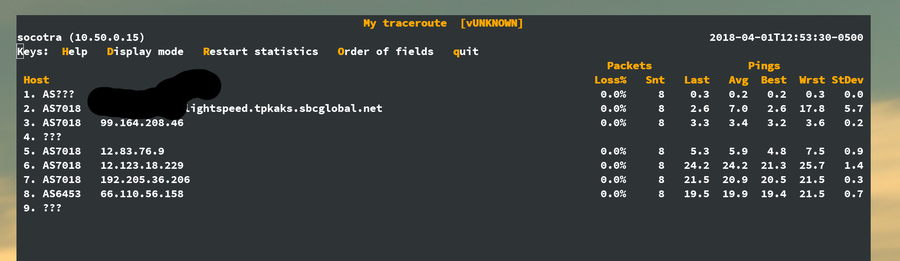
Something interesting I saw pointed out on the reddit thread about this is the ttl between 1.1.1.1 and 8.8.8.8 is the ttl is way different.
Your pings also have the same thing showing up 128 vs 53. I tried on my laptop and get something simmilar. traceroute to 1.1.1.1 is 1 hop which is wrong. 1.0.0.1 shows a few hops.
Unless you tell it not to, ping will try a reverse lookup on the IP you are pinging in order to display that to you in the output. It's a good idea to keep that in mind when you ping something, especially if you notice the first ping is abnormally slow.
Perhaps that depends on operating system. In the 30 years I have been using ping on Linux, the reverse lookup time is absolutely included in the first ping time.
I think AT&T's fiber modems are using 1.1.1.1. I'm getting < 1ms ping times and according to Cloudflare's website there's no data center close enough to me for that to be possible without violating the speed of light.
what happens if you go to https://1.1.1.1 in a browser? It should have a valid TLS cert and have a big banner that says, among other things, "Introducing 1.1.1.1". If your ISP's CPE or anything else is fucking with traffic to that IP, it wont load/display that
Call your ISP and ask them why they're blocking access to some websites. Ask them if there are any other websites they're blocking. Tweet about it. Etc
  $ ping 1.1.1.1
  PING 1.1.1.1 (1.1.1.1) 56(84) bytes of data.
  64 bytes from 1.1.1.1: icmp_seq=1 ttl=56 time=10.8 ms
  64 bytes from 1.1.1.1: icmp_seq=2 ttl=56 time=11.3 ms
  64 bytes from 1.1.1.1: icmp_seq=3 ttl=56 time=10.7 ms
  64 bytes from 1.1.1.1: icmp_seq=4 ttl=56 time=10.9 ms

  PING 8.8.8.8 (8.8.8.8) 56(84) bytes of data.
  64 bytes from 8.8.8.8: icmp_seq=1 ttl=60 time=10.7 ms
  64 bytes from 8.8.8.8: icmp_seq=2 ttl=60 time=11.3 ms
  64 bytes from 8.8.8.8: icmp_seq=3 ttl=60 time=11.1 ms
  64 bytes from 8.8.8.8: icmp_seq=4 ttl=60 time=10.5 ms
  PING 1.1.1.1 (1.1.1.1) 56(84) bytes of data.
  64 bytes from 1.1.1.1: icmp_seq=1 ttl=59 time=7.65 ms
  64 bytes from 1.1.1.1: icmp_seq=2 ttl=59 time=8.53 ms
  64 bytes from 1.1.1.1: icmp_seq=3 ttl=59 time=10.2 ms
  64 bytes from 1.1.1.1: icmp_seq=4 ttl=59 time=8.04 ms
  64 bytes from 1.1.1.1: icmp_seq=5 ttl=59 time=7.92 ms
  64 bytes from 1.1.1.1: icmp_seq=6 ttl=59 time=7.85 ms
  64 bytes from 1.1.1.1: icmp_seq=7 ttl=59 time=7.88 ms
  64 bytes from 1.1.1.1: icmp_seq=8 ttl=59 time=7.73 ms
  64 bytes from 1.1.1.1: icmp_seq=9 ttl=59 time=7.73 ms
BigPipe, Spark, Skinny and Vodafone don't believe in peering and thus don't peer with Cloudflare at APE. If you wanted the best performance then 2degrees, Orcon, Voyager or Slingshot are the best for this since they peer.
    iMac   ~ ping 1.1.1.1
    PING 1.1.1.1 (1.1.1.1): 56 data bytes
    64 bytes from 1.1.1.1: icmp_seq=0 ttl=64 time=0.688 ms
    64 bytes from 1.1.1.1: icmp_seq=1 ttl=64 time=0.814 ms
    64 bytes from 1.1.1.1: icmp_seq=2 ttl=64 time=1.153 ms
    64 bytes from 1.1.1.1: icmp_seq=3 ttl=64 time=0.752 ms
    64 bytes from 1.1.1.1: icmp_seq=4 ttl=64 time=0.755 ms
    64 bytes from 1.1.1.1: icmp_seq=5 ttl=64 time=0.789 ms
    64 bytes from 1.1.1.1: icmp_seq=6 ttl=64 time=0.876 ms
    64 bytes from 1.1.1.1: icmp_seq=7 ttl=64 time=0.869 ms
    64 bytes from 1.1.1.1: icmp_seq=8 ttl=64 time=0.830 ms
    64 bytes from 1.1.1.1: icmp_seq=9 ttl=64 time=1.387 ms
    --- 1.1.1.1 ping statistics ---
    10 packets transmitted, 10 packets received, 0.0% packet loss
    round-trip min/avg/max/stddev = 0.688/0.891/1.387/0.204 ms
Pinging 8.8.8.8 averages 8ms. CloudFlare must have a POP here in Nashville?
That's probably because AT&T is using 1.1.1.1 for something internal and breaking the public internet for it's users: you get a really fast ping on 1.1.1.1, but it's not the 1.1.1.1 you are trying to reach.
That's impressive. My AT&T wifi router caps bandwidth at 300mb/s (instead of 1gbs on ethernet) and add 10-20 ms to latency. And this is standing next to it and using 5ghz.
I'm guessing Google's resolvers are a little busier than Cloudflare's right now, because pretty much nobody not on HN right now is hitting them. Will be a more interesting comparison in 6 months.
I'd be surprised if increased load has a negative effect on 1.1.1.1's performance.
We run a homogeneous architecture -- that is, every machine in our fleet is capable of handling every type of request. The same machines that currently handle 10% of all HTTP requests on the internet, and handle authoritative DNS for our customers, and serve the DNS F root server, are now handling recursive DNS at 1.1.1.1. These machines are not sitting idle. Moreover, this means that all of these services are drawing from the same pool of resources, which is, obviously, enormous. This service will scale easily to any plausible level of demand.
In fact, in this kind of architecture, a little-used service is actually likely to be penalized in terms of performance because it's spread so thin that it loses cache efficiency (for all kinds of caches -- CPU cache, DNS cache, etc.). More load should actually make it faster, as long as there is capacity, and there is a lot of capacity.
Meanwhile, Cloudflare is rapidly adding new locations -- 31 new locations in March alone, bringing the current total to 151. This not only adds capacity for running the service, but reduces the distance to the closest service location.
In the past I worked at Google. I don't know specifically how their DNS resolver works, but my guess is that it is backed by a small set of dedicated containers scheduled via Borg, since that's how Google does things. To be fair, they have way too many services to run them all on every machine. That said, they're pretty good at scheduling more instances as needed to cover load, so they should be fine too.
In all likelihood, what really makes the difference is the design of the storage layer. But I don't know the storage layer details for either Google's or Cloudflare's resolvers so I won't speculate on that.
> In fact, in this kind of architecture, a little-used service is actually likely to be penalized in terms of performance because it's spread so thin that it loses cache efficiency
This is exactly what I'm seeing with the small amount of testing I'm doing against google to compare vs cloudflare.
Sometimes google will respond in 30ms (cache hit), more often than not it has to do at least a partial lookup (160ms), and sometimes even go further to (400ms.)
The worst I'm encountering on 1.1.1.1 is around 200ms for a cache miss.
Basically, what it looks like is that google is load balancing my queries and I'm getting poor performance because of it - I'm guessing they simply need to kill some of their capacity to see increased cache hits.
Anecdotally I'm at least seeing better performance out of 1.1.1.1 than my ISP's (internode) which has consistently done better than 8.8.8.8 in the past.
Also anecdotally, my short 1-2 month trial of using systemd-resolved is now coming to a failed conclusion, I suspect I'll be going back to my pdnsd setup because it just works better.
ICMP round-trip times don't necessarily prove anything - you need to be examing DNS resolution times.
Lots of network hardware (i.e., routers, firewalls if they're not outright blocking) de-prioritise ICMP (and other types of network control/testing traffic) and the likelihood is that Google (and other free DNS providers) are throttling the number of ICMP replies that they send.
They're not providing an ICMP reply service, they're providing a DNS service. I'd a situation during the week where I'd to tell one of our engineers to stop tracking 8.8.8.8 as an indicator of network availability for this reason.
Note, from Google Compute Engine use 8.8.8.8 as it should always be faster. I'm guessing the 8.8.8.8 service exists in every Google Cloud region. Even better use the default GCE autogenered DNS IP that they configure in /etc/resolv.conf to get instance name resolving magic.
Usually best to use 169.254.169.254, which is the magic "cloud metadata address" that talks directly to the local hypervisor (I think?). That will recurse to public DNS as necessary. https://cloud.google.com/compute/docs/internal-dns
I agree that's usually best, but one exception is worth noting: if you want only publicly resolvable results, don't use 169.254.169.254. That address adds convenient predictable hostnames for your project's instances under the .internal TLD.
Also, no need to hardcode that address - DHCP will happily serve it up. It also has the hostname metadata.google.internal and the (disfavored for security reasons) bare short hostname metadata.
The "backup" IPv4 address is 1.0.0.1 rather than, say, 1.1.1.2, and why they needed APNIC's help to make this work
In theory you can tell other network providers "Hi, we want you to route this single special address 1.1.1.1 to us" and that would work. But in practice most of them have a rule which says "The smallest routes we care about are a /24" and 1.1.1.1 on its own is a /32. So what gets done about that is you need to route the entire /24 to make this work, and although you can put other services in that /24 if you _really_ want, they will all get routed together, including failover routing and other practices. So, it's usually best to "waste" an entire /24 on a single anycast service. Anycast is not exactly a cheap homebrew thing, so a /24 isn't _that_ much to use up.
I'm in a city in southern Japan (so most of my traffic needs to go to Tokyo first), on a gigabit fiber connection.
    --- 1.1.1.1 ping statistics ---
    rtt min/avg/max/mdev = 30.507/32.155/36.020/1.419 ms

    --- 8.8.8.8 ping statistics ---
    rtt min/avg/max/mdev = 19.618/21.572/23.009/0.991 ms
The traceroutes are inconclusive but they kind of look like Google has a POP in Fukuoka and CloudFlare are only in Tokyo.
edit: Namebench was broken for me, but running GRC's DNS Benchmark my ISP's own resolver is the fastest, then comes Google 8.8.8.8, then Level3 4.2.2.[123], then OpenDNS, then NTT, and then finally 1.1.1.1.
Pinging 1.1.1.1 with 32 bytes of data:
Reply from 1.1.1.1: bytes=32 time=45ms TTL=53
Reply from 1.1.1.1: bytes=32 time=45ms TTL=53
Reply from 1.1.1.1: bytes=32 time=45ms TTL=53
Reply from 1.1.1.1: bytes=32 time=45ms TTL=53
Ping statistics for 1.1.1.1:
Packets: Sent = 4, Received = 4, Lost = 0 (0% loss),
Approximate round trip times in milli-seconds:
Minimum = 45ms, Maximum = 45ms, Average = 45ms
Pinging 1.0.0.1 with 32 bytes of data:
Reply from 1.0.0.1: bytes=32 time=46ms TTL=54
Reply from 1.0.0.1: bytes=32 time=46ms TTL=54
Reply from 1.0.0.1: bytes=32 time=46ms TTL=54
Reply from 1.0.0.1: bytes=32 time=46ms TTL=54
Ping statistics for 1.0.0.1:
Packets: Sent = 4, Received = 4, Lost = 0 (0% loss),
Approximate round trip times in milli-seconds:
Minimum = 46ms, Maximum = 46ms, Average = 46ms
Pinging 8.8.4.4 with 32 bytes of data:
Reply from 8.8.4.4: bytes=32 time=29ms TTL=56
Reply from 8.8.4.4: bytes=32 time=29ms TTL=56
Reply from 8.8.4.4: bytes=32 time=29ms TTL=56
Reply from 8.8.4.4: bytes=32 time=29ms TTL=56
Ping statistics for 8.8.4.4:
Packets: Sent = 4, Received = 4, Lost = 0 (0% loss),
Approximate round trip times in milli-seconds:
Minimum = 29ms, Maximum = 29ms, Average = 29ms
Pinging 8.8.8.8 with 32 bytes of data:
Reply from 8.8.8.8: bytes=32 time=21ms TTL=56
Reply from 8.8.8.8: bytes=32 time=21ms TTL=56
Reply from 8.8.8.8: bytes=32 time=21ms TTL=56
Reply from 8.8.8.8: bytes=32 time=21ms TTL=56
Ping statistics for 8.8.8.8:
Packets: Sent = 4, Received = 4, Lost = 0 (0% loss),
Approximate round trip times in milli-seconds:
Minimum = 21ms, Maximum = 21ms, Average = 21ms
Pinging 208.67.220.220 with 32 bytes of data:
Reply from 208.67.220.220: bytes=32 time=45ms TTL=54
Reply from 208.67.220.220: bytes=32 time=46ms TTL=54
Reply from 208.67.220.220: bytes=32 time=45ms TTL=54
Reply from 208.67.220.220: bytes=32 time=50ms TTL=54
Ping statistics for 208.67.220.220:
Packets: Sent = 4, Received = 4, Lost = 0 (0% loss),
Approximate round trip times in milli-seconds:
Minimum = 45ms, Maximum = 50ms, Average = 46ms
Pinging 208.67.222.222 with 32 bytes of data:
Reply from 208.67.222.222: bytes=32 time=61ms TTL=54
Reply from 208.67.222.222: bytes=32 time=61ms TTL=54
Reply from 208.67.222.222: bytes=32 time=61ms TTL=54
Reply from 208.67.222.222: bytes=32 time=61ms TTL=54
Ping statistics for 208.67.222.222:
Packets: Sent = 4, Received = 4, Lost = 0 (0% loss),
Approximate round trip times in milli-seconds:
Minimum = 61ms, Maximum = 61ms, Average = 61ms
I would be interested to hear from google (8.8.8.8) how much ping traffic that address gets ...
I know that I will quickly ping 8.8.8.8 as a very quick and dirty test of network up ... its just faster to type than any other address I could test with.
It looks like you are testing either from centers where cloudflare has servers or exchanging traffic with, which is likely true in a data center given the traffic it transports. What most users want is the ping time from home/office.
CleanBrowsing | Remote | Contract, Maybe full time
CleanBrowsing is building a safe & easy to use parental control solution for parents, families and schools. We already offer a free DNS-based control available on our site: https://cleanbrowsing.org and we are expanding it.
Looking for to fill a few positions:
-iOS developers
-Android developers
-UI/UX designers
-frontend developer (PHP)
-C developer
We don't have a career page up yet, but if interested, email us at cleanbrowsing@noc.org
I think the software development field is still pretty new and evolving. Think about it, 25+ years ago very few people were hired straight as software developers.
Most came from other industries to capitalize in the market need.
It will likely change as the current generation that started as developers go to 40+ and continue in the field.


CleanBrowsing is building a safe, fast & easy to use DNS-based parental control solution for families, parents and schools. We already offer a free Anycast DNS available on our site: https://cleanbrowsing.org and we are expanding it.
Looking to fill one position right now:
We don't have a career page up yet, but if interested, email us at cleanbrowsing@noc.org so we can chat.