If you take a look at their extension, it injects a number of separate content scripts on the document_start event for a webpage. This blocks document loading and Google's recommendation is to load content scripts on document_idle which would not block loading.
These scripts that are injected into every page (including all iframes) include this one which is a 25,000 line file:
Things like this can have large impact on performance. My company develops a Chrome extension and we are very focused on optimizing the performance of our content script and minimizing its impact on host pages. We handwrite all the Javascript code in the content script and manually include the very few third party dependencies we have in it. Yes, it would be a lot easier to use NPM with Webpack to build the content script file, but it's important to keep content scripts as slim as possible.
Also their Privacy Policy says they spy on absolutely eveything and share it with anyone and everyone. Just guessing that's what some of those 25k lines do.
I used LastPass for many years until I got tired of the slowness/high CPU, then I saw that Bitwarden had done a lot of work on performance and switched to it.
Never had any issues and I have at least a thousand entries.
And quickly searching passwords is one thing, but Lastpass was slow with filling forms and input fields too. Bitwarden use the same method as 1password[1] for autofill, which works great!
My main reason for switching away from LastPass was that Bitwarden's UI was much better looking. It's been working great for me since then (even after switching from Chrome to Safari).
Ooh, thanks for the tip. I've been sort of resigned to LastPass, but it's one of those things that strikes me not so much as software as an agglomeration of hacks. It certainly works, but it has so much quirky behavior both in Firefox and Android that I've been expecting them to have a major breach. I'll have to check BitWarden out.
As others have commented, yes you can by exporting as a CSV and then importing that into Bitwarden. Even the notes were successfully imported.
During this process, I also cleaned up my vault (some accounts had very long URLs saved as opposed to the base domain; e.g. https://www.foobar.com/signup&method=blah... => https://www.foobar.com) and discovered that a bunch of my entries had either empty usernames or empty passwords.
I am also a former LastPass user. I did have a stint with 1password before finally settling on Bitwarden; it just seems like the most reasonable option.
I semi-annually try most of the popular password managers (Dashlane, 1Password, Lastpass, Enpass, Bitwarden) and I always end up staying with 1Password. Both their desktop and mobile apps are very well thought out and there's all sort of small UX and UI finesses that make them a cut above the competition.
Having said that, you'll have to deal with a high subscription cost and proprietary (but audited) code. They are also unwilling to make a full blown Linux app.
How do you use it on linux? Just a browser extension? I've been on lastpass because the last time I tried, 1password didn't seem that convenient on linux.
This is how I used it. Though to be honest, one of the reasons I left 1P was because it genuinely felt like they only ever support Linux on accident. I guess now there’s a command line tool, but still, I feel much better with Bitwarden or Enpass as someone who runs only Linux both at home and at work.
When I left, there were still lots of things that the extension did not do, that the desktop app did.
Indeed, at least this is what I have been told by some friends of mine. I also use Dashlane so much that I have convinced some of my family members to try it out over the others and they have never looked back.
I checked out Bitwarden a while back and the mobile app is very sloppy to use compared to Dashlane. The desktop app (Electron) just keeps eating up my Macbook's RAM and it takes a while to auto-fill passwords in other apps. Perhaps the open-ness of Bitwarden may allow compatible alternative password-managers to rival Bitwarden's own clients or even Dashlane.
Right now, I'd rather pay for Dashlane since it does the job better than what I have tried out so far.
I am another long time LastPass user (2010ish) to (paid) Bitwarden convert. Simply better in every possible way. The UX/UI of LastPass is so bad, search and copy a password? Almost impossible.
It looks like they updated the extension but previously when you searched for a entry you couldn't easily copy the password, I had to get into the entry, edit, show password and copy it manually, flow that looks to be still in the web version.
This is my experience with everything LastPass touches. Chrome, Firefox, Standalone, iOS, same unresponsive nonsense. Thankfully that's limited to only the corporate environment for me, but if you have a choice, 1password has been amazingly slick for me outside of it.
Exactly that. I'm so happy I convinced my manager to let me rollout 1Password company wide. My problems with LastPass were the clunky web UI and the lack of control I had even for enterprise accounts. I wasn't able to do a password reset for a new team member who pasted the wrong password and couldn't login anymore later on. The email address was not usable afterwards anymore. Costs for us were the same, so it wasn't that hard to convince people after they saw the demo.
Funny you should mention the corporate environment. My company has a LastPass subscription and encourages us to use it, but they don’t prevent us from installing extensions, within reason. Given that , are there any good alternatives that are both secure and trustworthy while imposing as small a performance burden as possible?
I did this same experiment in September of last year. (just checked my orgmode notes)
My conclusion then was that the speedometer 2.0 benchmark is dominated by page load, because it does that a zillion times as it goes through all the different todomvc implementations.
The lastpass performance tax shows up mostly during page load.
The question is, how representative is the speedometer benchark of normal use?
It isn't perfect, and it does penalize LastPass's behaviour more due to its poor startup performance.
But I don't think it is entirely unrepresentative of real world performance.
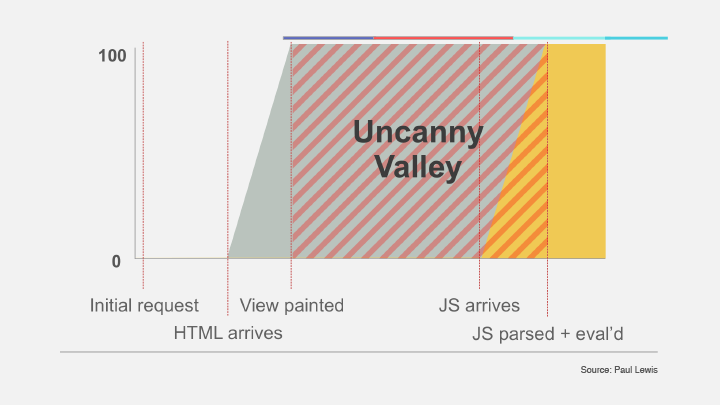
If your hypothesis is correct — if you have LastPass installed, your pages are probably going to load slower and you'll experience a longer "uncanny valley". The tax paid is worse for pages that are otherwise lightweight.
I built a Vue.js component for a Rails form that had tons of hidden fields and we couldn't figure out why it was grinding to a halt and lagging only on my bosses machine.
Turns out it was Lastpass and using their lp-ignore flag didn't do anything since it was loaded after the fact.
Curious why all the hidden fields though? Seems like an anti-pattern. I haven't used a hidden field in years.
I mean props if using server passed data would easily pass the data to your vue context.
I don't even use <form> tags anymore. just bind everything to a json object and transform the data as needed if combining stuff then send it off to the api on-click. Saves some work because I don't have to use the prevent tag in the form element or worry about the submit button binding.
I just add an @click to a normal button element and use axios w/ some modifications to enable our auth scheme. (Headers and what not).
I'm building very complex B2B software (link to company is in profile) doing phone call tracking and its a large legacy Rails app with standard `form_for` type forms.
On one page there could be hundreds of records because some customers like to create a thousand objects for one marketing 'campaign' and have customers routed (via IVR or geo or other flags from the source website/ad embedded js) to a thousand different sales agents depending on fine-tuned criteria (like if they press 1 to say they are over 50), and from there it could trigger a hundred different conversion triggers (for ex: to do CPA payouts to the traffic sources) and webhooks to various analytics services.
Anyway I'm slowly redesigning each part of the giant forms one-by-one and instead of AJAXing some parts separately I'm injecting the data into hidden fields which get submitted via traditional HTTP form-data along with the old forms.
I built a Vue component that automatically generates Rails friendly forms from any object. Including nested arrays of objects, with any degree of nesting. I plan on publishing it soon OSS as RailsForm.vue.
It sounds crazy but it was actually really simple to do and is only a temporary transitional thing. The only problem is I'm pushing the limits of browser memory/CPU on some customer accounts so I've made some performance optimizations like only rendering the hidden fields once the submit button is pushed.
I had a very similar experience. I couldn't understand why doing certain events was so slow in Chrome, but not in Firefox. After a lot of debuggin I realized that LastPass was the culprit.
If you add and remove a lot of input fields your page is going to slow down considerably, and there `lp-ignore` attribute didn't help at all.
I’ve had chrome extensions slow things down before but never this badly. It was crazy.
You can tell they are using extremely inefficient JavaScript to track form fields. And hire shitty developers who cant figure out a proper flag to add to be ignored.
I honestly don’t understand why people use LastPass when everything about it screams poor quality. Is it the lack of taste or alternatives for non Apple platforms?
My feeling is most use Lastpass because it's free and they don't know about Bitwarden, or (for the techies) didn't hear that Bitwarden passed a third-party code audit.
Lastpass also has a bunch of features missing in Bitwarden, but they're largely long tail stuff. My biggest complaint is it doesn't support biometric authentication on desktop.
Thanks for posting. I figured this issue wasn't just chrome. Been meaning to switch to BW and this might be the kick I needed instead of 'just living with it' anymore.
When I was using 1Password a few years ago it was much worse than this LastPass problem: The Windows version of 1Password resulted in a stuttering mouse cursor and completely lagging UI of the whole Windows system every time the CPU was used 100%. Uninstalling 1Password immediately fixed the problem and I could reproduce it on 2 different systems. I never looked at 1Password again.
If you are on iOS, do you see any reason to use 3rd party password managers ? I don’t seem to find any use for them if I am using the built in password manager
The only reason I can think of is that Keychain only works with safari. Sometimes I prefer doing dev work in chrome, and then accessing the passwords in Keychain is kind of a pain.
If there's a cross-browser way to access Keychain, I wouldn't use anything but that.
Is anyone else happy with the Trezor password manager [1]? After years of using LastPass, I just bought a physical Trezor wallet and its password manager works well enough considering it's a one-time-purchase.
I just switched from LastPass to BitWarden as suggested by a few comments below. I never realized what it was doing to my browsing experience. I thought it was just my internet connection or VPN slowing down! I wonder if there is an extension to show what other extensions are adding time to your browsing?
This is why I switched from Dashlane to 1Password a few years back. Dashlane was activating WebVR (pegging a core at 100% in the process), no idea why it was interacting with WebVR.
It might be worth checking if disabling WebVR does the trick in this case (it worked for Dashlane, but I own an HMD).
This is an important reminder that it's important to periodically review default tooling whether they be chrome extensions, desktop apps, phone apps, etc..
Im definitely guilty and glad someone did the research!


These scripts that are injected into every page (including all iframes) include this one which is a 25,000 line file:
https://crxcavator.io/source/hdokiejnpimakedhajhdlcegeplioah...
Things like this can have large impact on performance. My company develops a Chrome extension and we are very focused on optimizing the performance of our content script and minimizing its impact on host pages. We handwrite all the Javascript code in the content script and manually include the very few third party dependencies we have in it. Yes, it would be a lot easier to use NPM with Webpack to build the content script file, but it's important to keep content scripts as slim as possible.