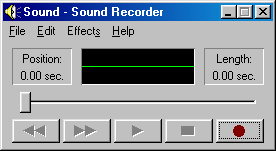
Looks nice, but the shadows on the buttons are wrong: the top and left edges should be white, the other two black. This way, the buttons look more like elements of a status bar, those had the borders reversed to produce an "inset" effect (like in this screenshot: http://173.255.209.242/chhtml/toolkit/demos/Windows/gifs/gad...)
I was always slightly perplexed as to how that difference in orientation of colors leads to the out/in effect. I guess it's not so much the left/right but the top/bottom that really achieves this phenomenon, given how most daily light sources come from above (sun, ceiling fixtures, floor lamps) and there are relatively few instances of uplighting (landscaping, ...) around us.
The up–down orientation unquestionably comes from the near-universality of light sources being above you. You'll notice that intense up-lighting is almost never found in the natural or artificial world.
(It's true that upwards-firing lights are often used in interior decoration, but these are almost always to illuminate walls and ceilings above us which then bounce light down to the contents of a room. Also, some techniques in photographic and studio lighting do use some up-firing lights, but these act as shadow fill, never as the primary light source—except when an unusual look is intended.)
To the extent that we expect a certain left–right orientation, this will almost certainly be predominantly a matter of consistency with prior graphical user interfaces. The near-universal standard of a top/left lighting metaphor goes at least as far back as the original Apple Lisa/Macintosh which cast its 1-bit, 1 pixel shadows to the bottom/right.
The fact that people of near-identical cultures can natively integrate either left-hand driving or right-hand driving suggests to me that there's no inherent reason why it needed to be one way or the other. Had the first interfaces begun with a top/right lighting metaphor, we'd probably be all as native to that as British people are with right-hand-drive vehicles.
Upward-firing lights are aimed at the roof to spread the light and create more ambient light. So is primarily used as a down-light by reflection anyway.
I'm not sure the left/right shadows are a learned thing from user interfaces. As a kid, long before I got my first computer I was drawing 3D forms. Shadows always was drawn as light came from the upper left.
Maybe this is because I draw with right hand so prefer light to come from the left so I don't shadow my hand?
Now you've got me wondering if the left/right shadow preference might actually be rooted in other natural phenomena besides human dominant handedness, like something with the rotation of the earth a.k.a. sun setting in the west.
Our brains are hard-wired to assume light comes from above, and 3D "pop out" from shading even means we can identify the shapes faster. More info and references in this section from Mind Hacks (I was a co-author):
(It briefly mentions Susan Kare's work who designed the first 3D buttons in Windows 3.0 -- 1990!)
There's another effect going on here which is visual affordances: not only does the button "pop out" but we immediately see it as something we can push. That's from the psychologist James Gibson in 1977.
There are a ton of cognitive quirks that are useful to know when designing interfaces. The pop-out effect is one of my favourites.
It is an artefact of how we scan things visually. Most of us read top-to-bottom/left-to-right and habitually look at pictures with that bias, so when the brain fills in the missing height detail for a 2D display using the light/shadow indicators it defaults to assuming the light source is in the top left. The affect designed for us doesn't work as well for those whose primary written forms follow a right-to-left structure. Obviously, as you mention, the light source being assumed to be high comes from a much older source as our main natural lights are up high.
The illusion of left/right is driven by which hemisphere you are on.
On northern hemisphere the sun moves from left to right and the morning being brighter than afternoon.
So top/left would be on average the brightest source.
That's correct. 98 was the first release to have it, chronologically speaking. 2000 was the first NT based Windows to have it.
So 98/NT didn't make sense to me. NT4, the last release to use the name NT, had a very Win95-like appearance. I also remember NT 3.51 (and I guess there were other 3.x) that had a very Win3.1-like UI despite being 32 bit.
Of course but the problem with updates is that you can never only get security updates... You have to get "feature enhencements" too... It would be nice to have 2 branches.
I don't mean just security updates though. I mean systemic security improvements coming from redesigns of components. Some of the changes are feature enhancements in the kernel too, some affecting security.
For all the criticisms of UAC or the Win8+ app store I would sooner trust a sandbox on recent windows than I would on Win2k. Even the XP SP2 era had huge security re-vamps that Win2k never got.
And there are performance things. I happen to know that Win32 message pumps have a better locking scheme on Win7 than they did in 2k.
The issue is in order to get enhancements in the lower layers you get forced into other bloat higher up.
Disclaimer, I spent a few years as a dev on the Windows team.
Even more to the point, the kernel major version number represented an implicit ABI compatibility for drivers.
Windows 4.9 could load drivers for 4.0. 5.2 could load drivers for 5.0. 6.3 could load drivers for 6.0...
Windows 10... can still load 6.x drivers, but it bumped the internal version number to 10.0. It is worked around because without an explicit "I'm Windows 10-compatible!" manifest, the OS just lies and reports an internal version of 6.3, along with the ProductName string remaining "Windows 8.1"
Makes sense, but they also had pretty aggressive detection of when compatibility mode would be helpful, so solving for the bugs with that seems like it could've worked. But I always like a good major version skip, e.g. Winamp (no 4, because they combined 2 and 3 to make 5), PHP (no 6, because... reasons), and nobody so much as thinks about IPv5.
It supports some markdown, but I agree, that and a dark mode (I made a really basic one for the Stylish extension) would be the only things I'd accept as a change.
Aside that anything like making the site full of JS for more functions would be a no from me. :-)
Someone mentioned how much they miss beveled buttons and how every button would be cooler with a beveled edge so I thought "well how about making everything beveled then", then I got a little carried away...
Anyways, mine is utterly impractical. I don't know how but I managed to make the site sluggish with just CSS. It's probably also broken in Chrome. This looks extremely cool in comparison!
To do this for Chrome, all you need is the popular Stylus extension [1] and OP can upload it to userstyles.org [2] for even more convenience (don't need to download a CSS file).
Also to be even more Windows 95-ey I recommend making the top links (new, past, etc.) look like a tab bar! (I really like the way the footer links look like a status bar.)
If you don't want to install a 3rd party extension (maybe it seems like too much of a risk for such a frivolous purpose), then you can make your own. Just download hacker95.css and create a file called manifest.json in the same directory with these contents:
Word of warning about userstyles.org: this site (as well as original "Stylish" browser extension) is in hands of some kind of PR agency that made some very questionable changes in the past and neglects this product now.
If you don't want to install a 3rd party extension (maybe it seems like too much of a risk for such a frivolous purpose), then you can make your own. Just download hacker95.css and create a file called manifest.json in the same directory with these contents:
So my anti-procrastination setting kicked in just as I made this comment and now I can neither edit it or delete it. I made the same comment again with proper formatting of the json file.
I don't think it's an insult anyway. I like the clean and simple look, and the Windows 95 theme gets a lot right in terms of UI design. Generally high contrast, easy to tell at a glance which widgets are clickable.
Hacker95 seems to get the Windows 95 buttons wrong though, showing them as 'sunken', and not giving a clear impression of being clickable.
It's a joky insult. Hacker News and Windows 95 have in common that they look objectively old. But what they also have in common is that they are function over form in an atypically pure sense, especially compared to some modern UI design.
Although I prefer a more balanced approach on the spectrum of pure function and pure form, pure function beats pure form any day
Seems no one has mentioned it yet but what bothers me about most of these stylesheet hacks is that they never get the font right. Granted I don't know what it would take to make the old font (MS Sans Serif?) browser-compatible, possible copyright issues aside(?)
I know this is unsolicited and I apologize for that, but check your Console logs immediately after you boot back up if you haven't already, there might be a hardware issue, and you ought to be able to get a good idea of what's going on by seeing what kext is affecting it.
My current and previous laptop have been fine, but I used to have issues all the time on a much older laptop, and the issue back then, I forgot exactly which piece of hardware it was, but there was a bug in one of the drivers that was patched in an update, I think it was 10.4.9 or 10.4.10 that had the issue, a known issue at the Apple Store; but they couldn't do anything about it from behind the Genius Bar. Generally if you're getting kernel panics though, there's either something wrong with a piece of hardware or with the driver for it, although it could be any kind of kext causing the issue if you have any 3rd party kexts installed.
I love retro-ish design but it's often not practical or pleasing, past the initial novelty, and a reminder of why things change.
This looks excellent (from the screenshot). It reminds me of a mid-late 90s Windows Usenet newsreader, which I wouldn't mind if every web forum looked like.
I’ve added a user style sheet in Safari somewhat recently to fix an annoying video player. I think it was easy to find in Settings. Can someone check if that works? Not near my laptop right now, and I use a 3rd party app on the phone.
It's easy to add as a user style sheet in Safari (Preferences > Advanced > Stylesheet), but there's no CSS selector to limit it to a domain, so it makes the whole web turn Windows 95 style, not just Hacker News.
(The comment there that removing this "is going to help increase speed significantly in the future" is pure BS. If anything, user stylesheet functionality was handled in native code --- just adding another CSS to the page --- which makes it far more efficient than going through the whole JS/extensions route.)
Ironically, IE11 is the last MS browser to support user stylesheets (Tools->Options->Accessibility) but Edge doesn't.
Even in Firefox, the fact that it's named "toolkit.legacyUserProfileCustomizations.stylesheets" is ominous.
The Internet is becoming more and more user-hostile, and it's not just websites who are responsible.
>The Internet is becoming more and more user-hostile, and it's not just websites who are responsible.
That's because the webbrowser has been pushed away from hyperlinked documents viewer, to essentially a virtual machine running untrusted code from anywhere.
It's probably Googles fault somehow. They seem determined to ruin everything.
Issue asking for reintroducing native user style sheets in Chrome, with precise argumentation and long discussion. Does not seem likely to be heard, but symbolical starring doesn't hurt…
Reminds me of those times when I built a website that doesn't have a functioning mobile view, put it on reddit, and it turns out that everybody is mobile
You could probably make a bookmarklet to pull the stylesheet from github and add it to the document stylesheets. Maybe using the new Stylesheet constructor?
Heres a fun Firefox fact. Firefox handles audio/media files differently than chrome. Since it has a small market share, it becomes a rather annoying lose-lose: either spend a bunch of time to support Firefox for the ~20 people that will access your site using Firefox, or you don't support Firefox.
It's a shame that laziness is more important than interoperability. Part of the life of frontend or webdev is dealing with compatilibity issues, and it has been that way since forever. If you got into this biz thinking you could do that work and avoid those problems you thought wrong.
Laziness? Don't you mean unpractical and financially unviable? If I support Firefox do I support Edge, Opera, Android Webview, UC Browser? Explain how pragmatic prioritization can constitute as laziness.