I... have a problem. I recently had ~1600 tabs open in Firefox. With a lot of painstaking effort I cut it down to ~750. Quite some distance to go still.
The default interface sucks once you have more than 50 tabs. I wish there were easy REPL-ish programmatic access to the list/dict of tabs (so I could filter out all GitHub tabs, or close all stackoverflow tabs, etc) and that was a first class citizen in the browser interface. This is one reason I’m really excited about the Nyxt browser.
PS: Part of it might be FOMO, but part of it is also that these links represent certain threads of thought/exploration and are like bookmarks of things to revisit at a later time. Yes, in principle I could export the list of tabs to a text file, and begin anew, but that’s not a fully satisfactory solution. I think we need tools & interfaces to better (more holistically) accommodate people’s intellectual workflows; what we have today is geared much more towards consumption.
As an example: why can’t we easily group tabs into projects and have bidirectional sync between the browser and project related resources (Eg: Some markdown/org file, or sync with Evernote/Notion/Roam, etc) so that whenever I resume working on the project, I get a warm start with the context mapped out (continuing from the previous session). And I want a much tighter relationship between my tabs and my project notes (akin to bibliography of references), including annotations on webpages, etc. If we are to use the web more effectively, the ecosystem surrounding browsers needs to grow up and help us get there.
This is quite a staggering amount imo... Why not just avoid painstaking and just start fresh? Is this a form of FOMO?
Edit, you are at the point where you need a search engine for your tabs, you might as well close them and use the internet directly instead of cached in your own tabs.
If I may ask, on what basis did you close all those tabs, did you read them all? What will you do with the rest?
Memex (https://github.com/WorldBrain/Memex/) provides for searching your history and bookmarks. That might help alleviate the need to maintain sets of tabs.
The Vimium extension for Firefox also happens to provide basic filtering of open tabs, although I've never tried it with anywhere near 1600. YMMV.
Other commenters have already mentioned Tree Style Tabs and similar extensions which can aid in grouping and managing things efficiently.
> URLs bit rot and their contents change. If you have a browser session that's old enough, the RAM contents are a saving grace.
This is a serious problem in my experience. To that end, Zotero is an invaluable research tool with browser extensions for (among other things) taking a snapshot of an open webpage. Its library exists externally to your browser though which might add friction to your workflow.
Safer and not a whole lot of work to backup your bookmarks if you're worried about changing or disappearing pages. Probably have a net time saving pretty quickly from regaining access to being able to use tabs as tabs again.
Shift-T for tabs. Shift-O for history, bookmarks, and domains (ie domain names that you've previously visited a page from IIUC). Like Vim itself, there's probably other useful functionality hidden away that I still haven't found out about yet.
I'm sorry to hear that Nobody should have to wade through 1500+ tabs.
It's frustrating to hear anyone struggle with that in this day and age. I've been there myself. But there are technical solutions.
I haven't had to deal with tab anxiety in years.
My browser stack is Tree Style Tabs, Session Manager, Multiple Tab Handler, and Tab Group Plus.
I regularly wrangle clusters of tabs.
If I have a tree of tabs that is spawned from an HN story or something, I can drag it into a new window, and then export it to a tgmg file from Tab Group Manager, put the tab collection file in my repository, and put a reference to it in my knowledge base. I might also embed it in an rtfd file.
If I don't need that kind of structure, I can just use shift or ctrl to bulk select the tabs I want, and paste the urls into my knowledge base. And effortlessly restore the list of urls to a new session when I want.
I'm able to re-create not just specific urls, but the context that I browsed them in.
If it is months or years later, it is really helpful to have a tree or list of urls, and maybe some notes. That makes it so much easier re-inhabit my state of mind during that research session.
I doubted whether it would be worth perusing, but I'm really glad I did. I love being able to recall research threads I started years earlier.
Unfortunately, it takes some effort to get set up to digest lots of tabs. I wish that this was recognized as more of a problem. It is so idiosyncratic that we are using open browser tabs as a temporary database to store lists of urls. Browsers should combine history, tab management, and bookmarks. It makes no sense anymore for those features to be separate from each other.
Yeah I usually have no open tabs at the end of a session. The point is that with the right tools, you can bulk capture the essence of what you were browsing without letting clutter accumulate.
Sounds like a great approach, can you tell us more about it? Do you have subfolders? Do you move or delete bookmarks when you are "done" with them? Would love some details. Thank you for the inspiration!
You are at a different level. No I am not being sarcastic. Anyone who is able to concentrate with more than 10 tabs open has my respect.
I figured that bookmarks, downloaded files, and open tabs for more than a day are mostly causing me remorse for not being able to ever get to those again. So I focus on tasks and use search to open what I need.
Is it just me or is Tree Style Tabs fairly buggy when it comes to focusing tabs after closing one? It seems half random to me.
It's also fragile at browser startup, sometimes the list is empty or the tabs are in a flat list. When I switch to bookmarks and then back, it's fixed.
So, generally very fragile. Which is annoying since the CONCEPT is so essential.
At that point isn't it better to just set up some bookmarks? Navigating 700 tabs is much harder than navigating a hierarchical bookmark list.
Personally I only keep open tabs that I am actively working in, if I have more than ~15 I get less productive since I have to hunt through to fine the one I need. Several times a day I just clear out all my tabs aside from a couple pinned ones.
I find the interface for Bookmarks sucks also. 'Show all Bookmarks' presents a clumsy floating window you need to arrange with your browser window and is useless for batch operations. You can do 'Show Sidebars' but pressing delete on a selected Bookmark doesn't do the obvious thing of deleteing a bookmark. Its quite cumbersome to right click -> context menu -> delete when you're pruning dozens, hundreds of things.
Bookmarks discard window layout, scroll bar position, back/forward history, form contents, etc. They don't stay in sync with tabs so you have to delete and recreate them.
I bookmark all tabs with CTRL-SHIFT-D then arrange the hierarchy manually in bookmark manager. Doesn't automatically do it all, but keeps me involved with my bookmark trees.
I'd say that if you need 1000+ tabs, there is a problem. Not with you but with the browser.
I mean, how can you not get lost? Do you realize the thing you are looking for is on tab 248 before lookin it up again?
At that point these are not tabs anymore they are a directory or a history. I think using tabs for that is totally inadequate.
Unfortunately, browsers tend to be lacking in that department. They have a list of closed tabs to restore, but limited to a ridiculously small number like 10. They have a bookmark system but it doesn't save the state of the page like a tab. They have a history but it fills up with crap too quickly.
An unlimited, easily searchable tab close history could make keeping lots of tabs unnecessary. It is much easier closing a tab when you know it won't be lost.
Props for being one of the few people to realize it's a tooling problem. The "umm why would you have so many tabs?" you always get on HN is a reminder of why most people are so bad at UX. Most people just can't see outside of their usage.
You're onto something here. I have a lot of tabs because it's a history of one thought to another. It's not just a set of tabs, it's a sequence of locations. Keeping them open is how I can remember to go back to them, how I can keep my state in them, and more.
I can envision a much better UX where your tabs become some sort of history entry where they are frozen in time (serialized to disk) and can be rehydrated. And you can easily scrub back to them even once they've been unloaded from memory and frozen. And you can create different sessions for different things, a window/session for today's HNing, one for today's work, one for play, etc. And you can reach back into historical sessions to load their state. And merge another day's session into today's because it had some outstanding tabs you wanted to get back to. And there'd be good ways to visualize this.
I know some things like tab groups and tab sessions exist. I personally use Firefox with tree tabs to get something like this. But there's more UX thought that could be put into it instead of just wondering why someone would want a bunch of tabs.
One of the main reasons I'm reluctant to close my browser and trash my tabs is because the exact sequence of tabs, what's open, the order they are in, the state on each one (like being paginated to page 58 in some in-browser book scan UI) is a snapshot of by brain and digital "desktop" at that moment. You're right, browsers do very little to help.
> I can envision a much better UX where your tabs become some sort of history entry where they are frozen in time (serialized to disk) and can be rehydrated.
Mobile Firefox already has this. Desktop Firefox might have a version of it, but I'm not sure (sometimes I see a loading spinner on a gray background for a while).
I think you're totally on the right track. What I envision is the ability to drag a tree of tabs into a bookmarks folder to get back to it at another time.
Fundamentally tabs, bookmarks and history entries are all just references to URLs (with a bunch of metadata) anyway. It's weird to me that the UX of these hasn't really converged all that much yet.
> how can you not get lost? Do you realize the thing you are looking for is on tab 248 before lookin it up again?
For me it works like “memory palace” technique. Driven by addiction a graph structure with multiple root node starts to build up so I can follow traces of thoughts and contexts among tabs and windows.
"Yes, in principle I could export the list of tabs to a text file, and begin anew ..."
I came here to complain that, actually, you can't.
Or rather, it's surprisingly complicated to export a simple list of current tab URLs to a plain old text file.
You need to dig several directories deep into /Library (or whatever, depending on your OS) and then use JSON tools to export ... I've already lost most people.
Why can't we just have:
about:tabs
... which is nothing but a one URL per line, text listing of all of our currently open tabs ? How simple and nice and useful would that be ?
Go searching for "how can I export tabs" or "how can I save tab urls" and you'll see thousands of people trying (usually in vain) to achieve this very, very simple thing.
Consider this an official, public bounty. Expires 2020-12-31.
I don't have time to write this patch but I especially don't have time for the lame, tired suggestion that FOSS cannot be critiqued by anyone but the authors.
(The bounty is $1500 if you "jhardy54" write, and have accepted, the patch. Consider the extra $500 compensation for this unexpected loss of smug, righteous indignation.)
Thanks for the bounty. Is this resolved when the patch is written and available for anyone to include in their source tree, or when it's merged into the Firefox tree?
(I want to clarify because I've had a patch open for 4 months that's received no attention from maintainers.)
Since my last patch (bugfix, one line) has been open for at least 4 months without activity I'm not sure how feasible it would be to land a new feature and have it releases in Firefox stable in ~3 months.
1. Tab groups: I have been an extensive user of tab groups in the past (when it was native in Firefox); it’s very helpful if your tabs cleave nicely into less than a dozen or so projects/themes, and you have no more than a few hundred tabs.
2. Tree style tabs: The extensions I’ve tried tend to be very slow and non-ergonomic for my use case.
3. The % trick: Didn’t know this; thanks!
4. Bookmarks: Yes, but browser bookmarks tend to be where information goes to die. It’s also very hard to organize in a useful way, or attach notes to it. How about some of the ideas in my parent comment, as a spiritual extension of bookmarks?
I agree that bookmarks are a relic. Workona (http://workona.com/) might be of interest to you. It combines tab groups with resources (our term for bookmarks). But unlike regular bookmarks, resources can be grouped, ordered, or reorganized easily. They display important info at a glance (favicon, page name, type of object like GDoc). They won't open a duplicate tab if one is already open, and you can even
replace your open tabs with a different set of resources (you choose which ones). Oh, and you can share them. So, bookmarks but redesigned for modern work. Would love to hear what you think if you decide to try them.
I have both, and while I haven't used Sidebery as much as I should (since I've known and become accustomed to TST first), I can say at least this: Sidebery has tabs groups. These display as icons to the side of the tab tree, and when you select one it will show the tree of tabs in that group only.
And then you can organise them somewhat into groups ?
I use tree style tabs with some custom theming to make it take up only enough room on the left to show the site favicon. It then opens up when I mouse-over.
I used TreeStyleTabs for a few years. But then, one day, I accidentally closed it -- and the browser was running so much faster I can't stand TST anymore.
I re-open it every month or so, and it didn't really change.
I can't notice it when I have 10-100 tabs open. It's unbearable when I have 1000 (which happens more often than I would like to admit).
It should be noted, though, that my web browsing machine is an early 2013 MacBook Pro with 8GB of RAM; It's possible I wouldn't have noticed on a faster machine.
On the same hardware, the same browser with TST disabled (and no auto-suspend) easily handles 1,000 open tabs - slightly slower than it handles 100, but barely noticeable. With TST it is unbearably slow.
I find Tree Style Tab even more useful than the old Tab Mix Plus extension. Anything I open from HN will be a child of the HN tree, which can be opened or closed as a group.
I recently "closed" 12000+ (not a typo) tabs in one of my Firefox profiles into OneTab. In another profile I have 30+ different windows open for different projects and contexts, and I have more profiles (typically one per WM workspace which are topical).
I've tried lots of browser addons/extensions and tools over the years, but none offered proper salvation. I have a design in my head of what kind of tool I'd like, but like everyone else I have no time between work and everything else to build it.
Long ago I used to blame the tools, but these days I realize it's me. I put minimum 32 GB RAM into my boxes, and it's because of VMs and browsers.
I'm there with you (1500+ in one browser instance). But I don't consider it a problem. I have tab suspend and full text tab search via add-ons, I group my tabs linearly by topic and date, and the older 1/3 of tabs I know position by heart. Because I use a single process browser+noscript instead of a "modern" JS-engine-centric browser (ie, Chrome/FF) even with 600 tabs of 1500 loaded in my ram usage is still under 3 GB.
Minimalism and other philosophies don't really translate over into digital spaces. I have as much "space" as I want and nothing gets in the way of anything else. I see no problems with my status quo since 2003.
It's easier to use Chrome for my work browser, so it only has a few dozen tabs open, but my primary home/sidejobs browser is Firefox, currently running at somewhere in the 1600-2000 tab range. Only Firefox can do that without barfing. (And that's on the old Surface Pro 4 i5/8GB - it runs just fine.)
I REALLY miss TabMixPlus, though... (a FF extension broken with the purge of XUL from Quantum)
Whenever I have more than 10 open tabs, I close all of them. Searching a URL from a fresh browser is faster than browsing through tabs, especially with the history in the URL bar.
Without addons, I “solve“ this by opening a separate window for each train of thought. When it comes time to go Marie Kondo I either close the window or bookmark all of the tabs for later.
This works great at home. At work I’m constantly fishing for which window some bit of information I currently need is in (though I’m not sure one window would fix that any better). So even MMMV.
So many health and monitoring tools have a web UI these days. Someone chats about a server acting weird, you’re in the chat, looking at logs and graphs in several spots, maybe using your own app, looking at commits in several modules, and looking up error messages online. Spread out across 2-4 screens.
Plus there’s whatever feature or bug fixes you were working on before that all started, and the research you were doing for a ticket you want to propose, and you have to get back to those when you’re done.
And somewhere there’s a window with this HN post you have to find again in order to respond.
I don't mean to be rude but I think this is maybe a psychological issue, not a technological one. I'm doubtful that 1600 tabs open in any way reflects some advanced or thoughtful way to work, it's just problematic.
'Junk Hoarders' -> 'Tab Hoarders'.
Maybe find a way to truly organize bookmarks and find a good bookmark manager plugin that lets you 'get to your stuff' as you need it.
I am in the same boat, and usually use that as "post-its", reminders of my current trains of thoughts. I can pick-up something, switch to something else, close that thread of tabs, and come back to the previous state. If something urgent comes up, I open a new tab.
Treetabs is useful for that kind of workflow, but very slow. I also use panorama tab groups.
If you're already on FF, you need tree style tabs. This extension is so popular it has its own extensions.
I also have dozens of things I keep an eye on, so there's no way tabs across the top would help me at all.
Main things I find useful about TST:
- You lose horizontal space, not vertical. This is great because you can now read the titles. I also do some magic to get rid of the tabs across the top, so I get some space back vertically.
- You can collapse a given tree.
- You can suspend a tab or a tree. Let's face it, most of your 1600 tabs do not need to be using resources. With suspend you keep the title and place so you don't lose it from your brain, but it doesn't sit there and eat RAM and CPU.
- You can style the sidebar to your liking. I like to make sure mail and slack tabs are their own colour, because they tend to be project roots from which many other tabs are spawned, and when they're uncollapsed I want to visually separate a set of tabs from the next. I also highlight the current tab.
Sometimes the line items in the history list aren't really informative, and if you can't recall what particular day you might have visited the page you might have some homework in front of you. I wish the entire page was catched in some way so I can search for a keyword or use some regex to make sense of my foggy memory. This is a computer for crying out loud, I should be using regex, not feeling like I'm digging through a filing cabinet of reciepts by hand, which is exactly what the experience is when sites title themselves opaque things like "Add Comment | Hacker News" for the 2000th time in your history log.
> use your browser's history function to find them back
This is what I do when I need to look something back up and it works pretty great honestly.
It seems like it might be a difference between Firefox's behavior and Chrome's though, because any time I've used chrome the suggestions it fed me were autocomplete results from google search.
The great thing about Firefox's "Awesome bar" as I think it is (or was) called is that it looks through your history and ranks things based on frequency / recency of visiting.
So if I want to look up something, there's a good chance I can just start typing the word I remember from the page title and it will pull up the result for me.
Firefox does let you select multiple tabs and bookmark your selection as a folder, it also lets you expand a folder of bookmarks as tabs. I don't use either feature though, as my tab use tends to be more around not closing a tab until I'm done with the task associated with it, by which time I've opened another dozen and working out which I can close is too much effort.
I had a quick look (because actually, having tabs load for a specific project would be quite helpful) and it looks like that might offer some of what you want?
If you really are digesting any substantial degree of 1600 tabs it sounds like you need a tool like a personal wiki to file info and something like rss to manage incoming sources of data.
If you just find yourself unable to close stuff you have read once and will never touch again you need to train yourself to use your tools more effectively.
If you strap enough engines to something it qualifies as a jet including a bike but it doesn't make it a reasonable means of transport.
Get a 'tab group' add on, Simple Tab Groups for Firefox. There is something similar for Chrome but I don't know off the top of my head.
I have a different group for any 'context' I often return to (or even a dump of 'researching random thing I may one day come back to'). Then I have one window open and I switch between contexts as needed and pick up from where I left off.
Have you tried OneTab? It's an add-on that squashes all your open tabs to a list and saves the list to a page. You can reopen tabs, remove them, etc. from the page. It's super good.
But for me at least, I've realized it's less about keeping content for later, and acts more akin to the conversational bridge "well, if it's important I'll remember it later" -- It just gives me permission to let the tabs go and move on, with a pretense that I'll maybe come back to them :)
That's a good way of putting it. The problem is remembering it later is very difficult with so much information. I use Tablerone so save and organise pretty much anything I think might come useful at some later point. Then I can find specific sites either by searching by the subject/collection I saved it in or by browsing the timeline... https://tabler.one/
I use tabs as a mindmap, and would really like the browser to present it as such.
An interface such as pearltrees would be a pretty good start, with visible links from topic to topic. The ability to collapse a group and all of its children, close a topic, annotate some tabs, full-text search, and maybe have them open again at a later date.
Maybe I'll get around to developing this at some point.
For instance, I am currently looking for accommodation, in addition to the usual stuff. I tend to open a (panorama) tab group for each sector or website, then a tab for each apartment, plus maybe a few more tabs for each to check on the map, pictures, contact forms, etc. I do not do that activity all the time, but need to leave that open to come back to it. I actually created a Firefox profile for this, but I'm using it to reply to this thread, so maybe the real issue is my with my ability to concentrate...
Recently hit 4000, with ~2000 in a single window. One thing that I think helps is remembering that you (ostensibly) have a browser history. Rather than keeping every tab you might want to come back to, close the ones you expect to be unchanged later (or that don't currently hold a particular needed state). You can then reopen ones that float up to your consciousness (i.e., the ones that are important) as necessary. Taking this approach made culling 1000 tabs not too difficult. Of course, this would be made much easier with a robust history search function, but good luck with that.
There is also at least a Chrome extension that lets you filter and close tabs by domain (name escapes me).
Personally, I usually prune a window with many open tabs,
usually created after a search for a solution or workaround for a bug,
down to the initial search(es) and any useful results,
then bookmark any remaining tabs into a folder,
in the hope that a future search for the same topic
might provoke an auto-suggestion, and in the usually vain hope
that I might someday curate all the folders for related topics
into a coherent hierarchy.
Congrats, sir, I don't think I've ever exceeded 2400. (I almost always work in one window to reduce the session recovery risk of accidentally closing a window with a bunch of tabs I want to keep.)
Wow. A man after my own heart. I finally gave up (partly because FF can be quite the memory hog when left open for a long time) and utilize OneTab a bit and have multiple tabs in each of multiple windows and use TabSession Manager to let me kill those windows and yet re-instantiate them at will. I guess it just comes down to organization - a straight-list wouldn't help me get my head around it all (which is my problem with Sublime Text, where I have ~1000 unsaved WIP files. That's also a problem for me)
What would help me in reducing tabs/windows is good session management. I want per-window sessions that I can close and restore with their own history. Each window would then have a purpose, be helping me work on a project.
Instead I have history that searches across all my work (news, python development, shopping, etc) and if I want to pause on some of it, without just leaving the tabs open, I have to manually delete and recreate the bookmarks to represent my current state.
FYI, you can do a lot of this stuff with AppleScript on the Mac. E.g., my workflow is to collect tabs on a topic, then I run a script that copies those tabs as a Markdown list. I paste that list into my notes for a project. Then, when I come back to that project, I can just select the list of Markdown links, and run another script to open them as tabs again.
Have a look at Opera's workspaces. Unfortunately there's a limit of five, but if i could have one of those for each topic I would be happy. My tab problem is considerably worse than yours.
My take - some of us leave tabs open way too long because we fear not being able to get back to those sites again… it’s loss aversion. Tabs aren’t the core problem per se, it’s recall. We need to solve the “I want to get back here again” problem.
I primarily use Brave and effectively start fresh every day. I might get up to 20 open tabs at any given time, and I sometimes use tabs as a sort of Inbox that needs to be cleared. But sometimes, it’s best to declare tab bankruptcy and start over.
Something I learned with tabbed browsing is that its important to clear the working "memory". One of my most used shortcuts is "close other tabs", and "close tabs to the right". Keeping tabs open should be like allocating to the stack and frequently cleared when the task is done. I might open 5 tabs from one link but when I have what I need I'll move the only the ones I need to the left and close the ones to the right. I find clearing tabs very refreshing - when in doubt: nuke it.
The introduction of tabs was fantastic, and I'm very glad you brought it to us. It bundles windows together, I would rather pick up my firefox bucket and look for a web page there than to look through a dumpster of software windows. But it took me a very long time before I figured out how to not let it get out of hand.
If people are afraid of losing tabs, they just aren't trusting their own memory/curiosity enough. When something is important, your mind tends to remember it, and if it wasn't, then its okay to have lost it. If something was that crucial, you can just Google it again, and if you cant find it on Google you still have your browser history.
Good point. I've lost track of the number of start-ups that proposed some kind of "Search your browser history" functionality, which, to be honest, I've wished for myself. But I don't know of any that have even made it to released-product stage.
Not really -- What I'd like would be something that doesn't require me to annotate, in advance, what I want to find again. I often think, "I know I read something about this a while back!" and then I try to think which website I'd seen it on. The ones I've read about just watch your whole browsing history and let you search that.
I also couldn't get it to work when I tried a while ago (which I imagine they've fixed).
I never understood how folks end up with 20+ (100+ !?) tabs just hanging around ALL the time. For me it's so much visual noise.
I can see it happening when you're in the midst of research or troubleshooting. But when I'm done or have solved my issue I'll note in my PR where i found solutions or add the useful pages to my bookmark service (raindrop). Then close all the tabs!
I never understood how folks end up with 20+ (100+ !?) tabs just hanging around ALL the time.
I get there sometimes, but never in the same window.
I maintain multiple web sites, so each site has its own desktop. Plus there's another desktop for one-off tasks, and one for communicating (e-mail, etc...).
Within each desktop is a browser window, which may have five or six tabs. If I'm doing testing, that number balloons. But only while testing.
So between all the sites and tabs, I may have 50 or 60 tabs. But since they are kept in different browser windows on different desktops, they're manageable.
All of these windows relate to different things. For example whenever I check HN I fire up a new window. I might not have 2 hours of time to read/research everything interesting I happen to find so I just leave that window open for later.
Whenever troubleshooting I do the same as you, a window can get up to 20 or something tabs, but once the problem is solved those get closed. Or if there are interesting tabs in there that warrant future research, they get grouped in a new window.
On Mac I Cmd+tab through apps and Option+tab through windows of a specific app (don't remember what the default combo is). Or I swipe three fingers down to see all app windows. And I also use Tab Switcher[0], which allows me to Cmd+Shift+K to fuzzy search all open tabs.
This setup is not optimal, but it's not that messy/problematic for me.
I'm one of those "tab-addicts". The problem is that I use Tabs for everything: reading list, history, bookmarks.
Right now I have 8 pinned tabs for email, calendar, messengers and such things. Then I have a couple of interesting news articles etc. that I left open to read later. I also left open some of my work/research flows (so 3-5 tabs each that belong to the same project topic) that I didn't really finish or was just to lazy to close.
Tabbed browsing: a lousy band-aid over poor browser document and state management (2014):
...What I want is to maintain a list of current references, preferably with some spatial context (tree-mode browsing is great for this) to what the relationship is between pages in my browser session. I do not need is for every last single page to be open at the same time, sucking down memory, CPU cycles, and worse: playing videos and/or making noise.
That state-management is missing. Bookmarks aren't really it -- they're a permanent quick-reference to stuff you want to go back to, and as with any storage locker or closet, suffer from the clean-out problem: it's a goddamned pain in the ass to go and sort through the stuff you've tossed in there and clean out the junk.
Browser history isn't it either: it's too comprehensive, is insufficiently contextualized, doesn't record relationships between pages (other than, maybe, relative time). On mobile devices it's a chore to sort out where in your history a given page was in the highly constrained display available. Site-supplied titles are often absolutely worthless for finding content (though some such as HN do this well).
There's a space between the comprehensive listing of everything you've visited, and the highly organized catalog, that's missing in the browser space. Effectively: the current workspace, with the papers and books with which you're currently working open in front of you. I've been playing with this stuff for decades and it's still a frustration....
want to try amna?? It helps you break things down by task. I’d say it’s still super early, but seems like the right balance of random browsing and collecting items as part of a context.
Hey - nice! Yup that was some user research we had done. Working on making the website better as well.
Few more details here: getamna.com/demo
Interesting! Currently the solution is primarily a GUI based system using Chromium for rendering. But the data is stored into a JSON file organized a group of tasks with website urls. I haven't explored too much around a CLI before. I know that org-mode is super popular, but I've never played with it much.
Putting the browser (and other tools) inside a workflow box seems long overdue. That alone is genius. It's a key principle I've been leaning toward as well, though with a somewhat different target as to projects and scale.
With top-bar navigation, it's impossible to navigate after a small number (few dozen) tabs. With sidebar nav it's more useful, similarly Firefox Mobile's cards-type view.
Tree-style tabs provide emergent context and semantic organisation without conscious effort which flat linear presentation does not.
I made a browser to deal with this [0]. I've basically abandoned work on it, but I still use it as my daily driver (granted I don't push my fresh builds up as much as I used to and there are a couple of bugs).
It provides me such a huge benefit because I just swipe my hand to destroy dozens of browser tabs. And all the while I can see the name, have them hierarchical, change their groups, etc. I go on deep GitHub or Wikipedia dives and close or collapse that entire line of thought so easily. Tabs are essentially mind maps. I wish a larger vendor with real time/money would invest in a similar many-tab model. The concept is of course directly taken from the tree-style tab extension in FF, but even that extension has suffered since the move off of XUL, and I can't easily close a ton of tabs just by dragging over the close buttons anymore (among other things).
How do people manage to manage hundreds or even thousands of open tabs? And most importantly, why? Are they using tabs instead of bookmarks?
Usually I have no more than ten. Even when searching/researching something it doesn't get more than twenty - open all the interesting search results on the first search page, usually that's enough to find whatever I'm looking for. If not, tabs are being closed one by one or are being bookmarked with appropriate tags. Repeat for the next page of search results.
Tabs were a mistake. They were a hack to work around window managers that lacked enough features and now we have a "window manager" inside of a window manager. Probably most apps have their own tab interface which works differently from every other app. We should rethink the design, improve the window managers, then remove tabs.
I don't think it will ever happen, but it would be nice.
There was a Compiz extension that permitted window tabbing like this. I did not enjoy its use. I attempted to use it to create "environments". It was less effective than using workspaces because workspaces allowed full windowing.
KWin does (did?) this as well. I think the biggest problem is that if you open a new "window" it doesn't know that you want it to show as a new tab on the same window. I think that this is largely because X doesn't actually know which window opened the new window.
I used the KWin tabs a fair amount, but they didn't fill the same use case as browser tabs. It would be interesting to see this implemented, of course you would also need to seriously patch the browser.
I'm probably in the minority because I never use tabs much ---- I prefer multiple separate (overlapping) windows that I can size and arrange as desired, because I often use the information from multiple sites simultaneously. I've seen a lot of others who flip back and forth between two tabs many times, trying to compare them, and have never thought they could open two windows and put them next to each other. Of course, I've been using browsers before they had tabs, so it could be experience, but I wonder if the current "single content" model has severely degraded users' ability to compare and contrast different sources of information.
I found myself using separate windows more during my time with a heavily customized Manjaro install, where I used a tiling window manager and had lots of ways of quickly adjusting my window layout with minimal extra information needed.
I think managing windows in say... Windows is terrible (even if macOS manages to be even worse). There are a few third-party applications to sort of emulate tiling WMs, but they're very clunky and software likes to act "surprised" about it and often have weird behaviours. That, and the requirement of window chrome.
That being said, for your specific example of flipping through two tabs, I still find that very useful as a visual diff: get both tabs on the same scroll position and spam Ctrl+Tab and your brain will quickly generate a diff between both. The ideal solution would be actual universal diffing tools, but that's far-fetched.
I've tried tiling and it just doesn't feel right to me --- not being able to resize windows to the right dimensions is frustrating. I guess that's one thing I agreed with Microsoft about; the earliest versions of Windows had a tiling WM.
Also, by comparison I meant reading comparison, not visual comparison. But even the latter is easier with separate windows: resize them to the same dimensions, then put them on top of each other and increase the transparency of the top one.
Yes, though I prefer http://windowgrid.net/ since I always keep relayouting windows around, at least when I tried, FZ had me going out of my way to change layouts a little bit.
Try the Stack browser. Instead of tabs, you have side-by-side, side-scrollable, resizable panes. It makes it so much easier to interact with multiple sites at once.
I like that the author mentioned “goal-oriented”. Perhaps intent is another way to phrase it. There are few websites we visit with intent, and others are for just “browsing”.
I’ve been working on Amna as a way to help with intent driven work. Instead of opening a frenzy of tabs, it makes you write what you’re working on first, and then provides you a browser or multiple browsers to help you. It’s cool because when you have to get back to something, you just click on a task, and everything comes back. E.g right now I’m working on editing a website and sending out a newsletter, those are two completely separate items, and when looked at individually, they only have like 4 tabs each.
For some reason once the tab list reaches the other side of the monitor it makes me feel uneasy, so I close down any tabs that I don't need open.
I've never found the need to have more than 8 or so tabs open really - and if I want to compare things, then I just open another browser window and pop it next to it, or on a different monitor.
I'm sure there are very good reason for people that have 50+ tabs open - everyones brain works differently after all - but it makes my brain itch!
My uneasiness comes from a realization that too many tabs means that I am not prioritizing tasks. Sure enough, a quick review of the tabs results in most of them being closed since what felt important at the moment was not important in retrospect.
As for people who have 50+ tabs open, I am left wondering if they are going about things in an effective manner. At least in Firefox, it is easy to select a bunch of tabs and bookmark them for future reference. It is also easy to load up all of those bookmarks at once when needed. It is a lot easier to deal with the eight tabs from Project A and the dozen tabs from Project B independently than it is to deal with all twenty at once. (Granted, this could be made easier. The big drawback with bookmarks is that they are a snapshot in time, rather than the reflection of a dynamic project.)
I keep my tabs under control and always set FF to start with a fresh session so I loose all tabs every day. Works for me.
The new FF for android though forces a new tab to get to my favorite websites and does not allow for a clean session after close, so I now have 47 open, mostly the same 4 websites :s
Currently there is a "clear private data on quit" which you can use. Just uncheck everything but tabs. You have to manually select "Quit" from the menu to trigger it.
Beta versions have the option to close tabs after a set inactivity time which I can't wait to land.
Thanx for the tips but I can't wait until hitting the address bar just gives me an overview of my favorite sites again. I don't need any new tabs, I only used them to store thing for later (as in next) reading.
Their links are dead now, but Tangram browser (2015)* was an Android browser that tried to break up researching on the web into three distinct UI tabs.
1. Seek:
If you give it a search term it'll display the results as list of links
2. Sort:
Any links or images you click on while in Web goes into a list called the Stack. I think it acts like your working memory in the same way that a traditional window of tabs might, and the act of sending links to the stack may be related to the "seeking circuit".
Links in the stack can be clicked on to navigate to, or swiped right to be sent to the Store section.
3. Store:
Links here are saved from the stack as you use the app, and you can create folders.
* https://imgur.com/gallery/AwBTxlZ
Here's an imgur post I just made with screenshots of the walk-through and a gif of usage. I don't use it anymore because it's been unsupported for years so I'm assuming that it's not exactly secure, but I loved the idea.
Interesting that nobody mentioned not using tabs at all. I adapted the chrome.css of my firefox to hide tabs altogether, so I can get more screen real state.
That paired with Vimium allows me to hit T to get a list of all open tabs, which I can then incrementally search. If I want to open a link from history, I hit O instead.
I've done that as well and it's great. Well, if I really need tabs, I use the tabbing that's built into my window manager (Sway). But it makes me really consider if I need it, and then it's easy to pop the "tabs" out, move them to different work spaces, etc. It's such a darn-clean look too.
You can deactivate it for sites where it interferes with your workflow. I've become used to switching tabs when it doesn't work, or hitting Cmd+L and searching from the address bar.
To be precise, I use a combination of Ctrl+tab, Cmd+L, T and O, in that order of frequency. I don't mind repeated tabs, so sometimes I'll just do a web search for whatever item I wanted again.
I hope Mac Safari Teams gets to read the link and HN's comments, they ignore the power users and try to dump down Mac Safari to iOS.
With Safari 14, Fav icon is now on by default, you would think this is great, except the Tab now shrinks to Icon size once you have a dozen or more. Instead of the old Fav Icon + Text Description in the Tab. i.e How Firefox behaves.
They also got rid of Top Site, and instead it is now an iOS Safari design like Start Page. You can tell by their much narrower design compared to your widescreen Mac.
One way to save memory if you have a few dozens or hundreds of Tabs, is to unload them by quitting Safari and Start again with previous session. This way all the Tabs are unloaded by default, they are there sitting idle. Basically just a list of Tabs. ( This also works on Chrome and Firefox )
But if you somehow finger swipe or accidentally press the Show Tab Overview, Safari will reload every single tab you have in the background just to create a Thumbnails for your Tab. If you have 1600 Tabs like some here, you will quickly run out of memory and start paging hundreds of GBs of data to your SSD. Basically shortening your SSD's life span.
And to those questioning why the large number of Tabs. I mean on one hand HN keeps pushing everything should be SaaS and Web Apps. Project Planning, Email, Social Media.. etc. On the other you have Research Notes, subject I need to research that instantly open a dozen tabs or Amazon / Online Shopping. Or simple daily RSS where I just Command Click all the news item I want to read. You also have sessions you want to read but you dont have the time right now.
All we really need is a Show All Tab Page as a list instead of Thumbnails once Tab number goes over certain number, with a Search Field at the top that hopefully search the Title and some Meta Data. I dont want to kill my 2015 MacBook Pro. It may be the last MacBook Pro with a decent keyboard judging by the way things are going.
Firefox containers, paired with Simple Tab Groups helped me to fix this.
I work on multiple projects and it's common to have multiple Github and alike issues, and other pages open. With Simple Tab Groups, you can select to group and only show tabs that belong to just one group.
It's easy to move tabs between groups. When the tab group is switched, tabs from the other group are offloaded from memory, effectively making them bookmarks.
Pinned tabs (webmail client, a note taking app, and music player in my case) are shown in all tab groups.
I know it helped a lot, because I use Chrome on my Android, and I always have ":D" in my tab button because I have more than 100 tabs open.
For anyone else who considered Panorama to be their favorite feature of Firefox before they killed it, the closest replacement for it I've found so far is https://addons.mozilla.org/en-US/firefox/addon/tiled-tab-gro.... It's not at all perfect from a UI standpoint, but it hasn't lost my tabs or crashed the browser yet.
Briefly I was looking for an addon that completely disabled tabs, and removed the tab bar. Every action that would normally open a new tab would instead open a new window.
Since I use a tiling WM, the idea was that this would make it easier to navigate through my tabs, and also keep my attention from branching so often. If I had something that I found useful enough to keep around, I can move it to another virtual desktop.
Unfortunately, I never found such an addon, and I'm still not set on that workflow in general.
When I am working on a project, e.g. researching a laptop purchase, I will open a new window to act as a container for all those research-related tabs, then when I am done the entire window can be closed.
Vivaldi has a notion of tab-within-tabs, but the UI is very subtle and the tabs^2 very small and fiddly to reach with a mouse, thereby violating Fitt's Law.
Firefox used to let you have multiple sets of tabs within one window and cycle between them, completely hiding the inactive ones. Effectively it felt like you had several browser windows within the one window, and picked which window was active.
Looks like this started way back in Firefox 4, and the UI was a bit all over the place, but I liked using it (mainly by keyboard shortcut):
Panorama was a firefox killer feature for me. So slick, so useful.
I _really_ enjoyed the ability to switch between different sets of tabs depending on which project I was focusing on at the moment. The Panorama UI made it quick, simple, and painless to do. It seems like most users simply use multiple browser windows, but I've honestly never been able to figure out how that works effectively when you're juggling multiple projects at once: when I'm not working on a particular project, I want it completely gone and (safely) hidden away so that it doesn't distract from my current project.
And then of course Firefox killed the Panorama feature. With the rationalization that no one used the feature and that it would be better implemented as an extension. Except that the extension went unmaintained after a few months. And then later, Firefox broke the APIs that made Panorama possible. The net result being that in the past few years, my productivity in the browser plummeted.
There are various tab management addons for Firefox but almost all of them have the following downsides:
* geared towards manually saving and restoring tabs (I don't want manual anything, I just want to switch between groups of tabs with a couple of clicks)
* not actively maintained
* buggy (as in, loses tabs for useful content that in some cases took a long time to find)
So far the one I've had the most luck with recently is Tiled Tab Groups (https://addons.mozilla.org/en-US/firefox/addon/tiled-tab-gro...). I don't use the UI for it, though, unless I'm creating a new group. I just click on the icon in the toolbar and select the group I want. It's still on probation as far as I'm concerned but it hasn't crashed or lost tabs on me yet.
+1 for Cluster. I settled for OneTab like many, until it deleted all my tabs. Happened to many people, and is fatal. Then I used Session Buddy. Only wished it had drag and drop, which is when I found Cluster. Drag and drop is important for when you branch out from the group and for weeding and consolidating tabs. Cluster works great with a big screen too which is what I have.
I've also been known to have an absurd amount of tabs across multiple browser windows. Upgrading to a new machine with quite a bit more RAM didn't help either. About once a day, I'll go through, and without looking, close all my browser windows. If I try to go through and choose which tabs to close individually, I get a hoarder mentality where I can find the use in everything. "Actually, maybe I do want to read that article about raising your own livestock", I'd think to myself knowing full well I live in a city.
Worse case scenario, I close something that will take 15 seconds to get back to when I realize I need it.
It baffles me to hear how many people use tabs - some vast amount open at once. I open and close pages as I read them, and only have what's relevant to me open at any time. To me this is what Reading List and bookmarks are for.
A solution that seems to work for me is keep notes instead. If I am interested in something I stick a link and some brief notes in a markdown document and make sure to include as many descriptive words as possible. That way I can grep my notes folder later to look for the note I made.
For home I keep a separate file per day. For work I have a monolithic "general_notes.md" which I add stuff to sequentially. Generally work notes need to be found quickly, so one file makes sense. For home I am not so time pressured, so grepping through multiple files is an acceptable solution.
I've settled on vertical tabs, and use an extension that limits it to the number that fit on my screen without scrolling, which is around 30.
I also no longer use bookmarks. I use the browser's autocomplete of sites I've been to before, and failing that either remember the complete url or give up.
I used to do a lot of bookmarking and a lot of tabs but I found neither really added value for me. If I don't remember the site, I probably don't need to be there.
That said, I don't try to really convince others to do the same (except vertical tabs) cuz I recognize not everyone will find the same value I do in it.
Isn't this just browser history? I close tabs very aggressively (usually hovering around Tabs Zero if you exclude the always open (like calendar and messaging apps) and regularly fish things out of my history.
Browser history currently does not preserve local history. All modern browsers, on the other hand, will preserve history for the tab when you "undo close".
Wouldn't be great to save all the open tabs, and not only restore them (there are tons of browser extensions that do that), but also treat them as a collection to share, restore in a different computer etc? I built that feature into Histre : https://histre.com/features/save-restore-tabs/ if you're interested.
I really appreciate the author's take on the issue.
Internet is such an integral part of our lives, and so many people's computer usage is all about just using a browser. Which is why it's interesting that even after about 25 years of the first browser, we have almost the same interface to accessing the INTERNET. And it definitely can be made better!
How about "history as a service"? Your history is encrypted and synced remotely.
Every page/tab you've got open, you can add tags and notes. So even if you close everything, you should be able to find what you visited before based on your custom annotations, even if it was years ago. Then, no fear of closing all the tabs.
I've noticed that as I've gotten older my tab behaviour has changed. When I was younger, I used to operate an extension that'd kill tabs I hadn't accessed in the last hour. Chrome doesn't really give you the same control over tabs. I've tried firefox but it's noticeably slower in comparison.
So what a browser mainly needs a a way of bookmarking that also stores some of the state of the page. Like position on page, selection, video/audio-position, saved to local cache.
Latest safari 14 screwed up tabs. Now when you’ve got lots and icons enabled the little text snippet disappears so you’ve got aesthetically looking tab icon. Useless! Must be the worst browser tab experience, especially on iOS.
If there’s one company that can unfuck browsers its ironically Microsoft...
I close them often, middle-click on the header or Ctrl+W. I also miss opera's hotkey to close all tabs except the active one.
When I'm doing some research where I need lots of them at the same time, I use OneNote or sometimes Word to keep the links, adding a line or 2 of text about that link.
I have had around 200 tabs opened in my mobile. This was till I realized that this is just FOMO and is due to lack of focus. I created a strict there should be no more than 5 tabs in the browser at the end of each week. Things have been much better since then.
Doesn't Firefox searches through open tabs while you type in the (indeed) awesome bar ?
I don't see where the problem is really. Plus the session manager extensions I have tried are not "stiff", they work well.
Have been having the same problem but now getting less painful as a quick TL;DR style (many articles start to adopt starting with a TL;DR at the top) read (to get the core ideas) and save useful ones with Diigo (replacing del.icio.us? to achieve read it later) worked well, effectively reduced FOMO.
> NOTE: Session Buddy for Chrome is handy when suffering from power loss (MBP hang, Linux workstation power cord got kicked off, etc.).


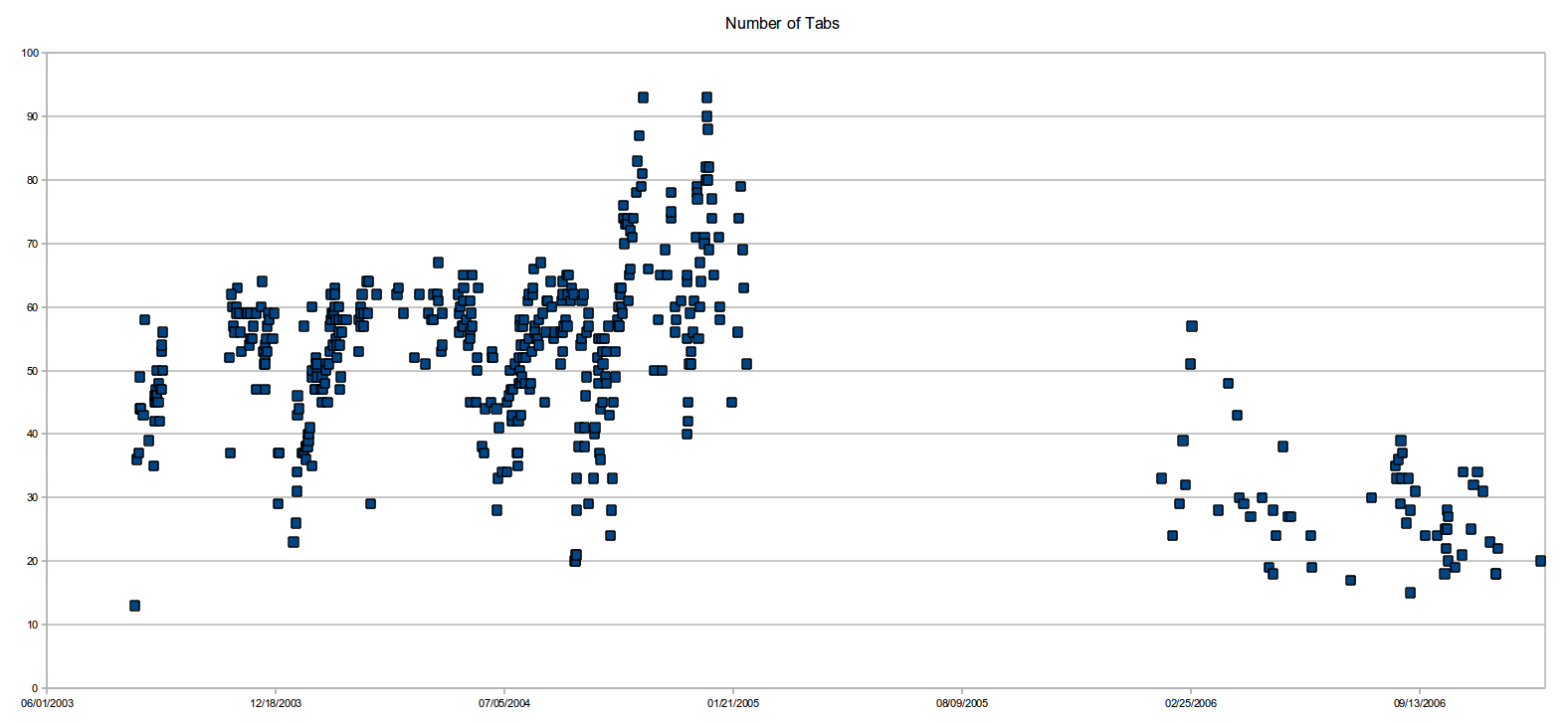

The default interface sucks once you have more than 50 tabs. I wish there were easy REPL-ish programmatic access to the list/dict of tabs (so I could filter out all GitHub tabs, or close all stackoverflow tabs, etc) and that was a first class citizen in the browser interface. This is one reason I’m really excited about the Nyxt browser.
PS: Part of it might be FOMO, but part of it is also that these links represent certain threads of thought/exploration and are like bookmarks of things to revisit at a later time. Yes, in principle I could export the list of tabs to a text file, and begin anew, but that’s not a fully satisfactory solution. I think we need tools & interfaces to better (more holistically) accommodate people’s intellectual workflows; what we have today is geared much more towards consumption.
As an example: why can’t we easily group tabs into projects and have bidirectional sync between the browser and project related resources (Eg: Some markdown/org file, or sync with Evernote/Notion/Roam, etc) so that whenever I resume working on the project, I get a warm start with the context mapped out (continuing from the previous session). And I want a much tighter relationship between my tabs and my project notes (akin to bibliography of references), including annotations on webpages, etc. If we are to use the web more effectively, the ecosystem surrounding browsers needs to grow up and help us get there.