It's a kind of belated consolation that people are finally waking up to the potential of transclusion, structured notetaking and active reading in assisting and boosting human intelligence, decades after the onset of the still unfulfilled visions of forefathers such as Ted Nelson and Douglas Engelbart; and it's definitely great to see skillful people working on the vastly unpopular field of general-purpose production software of the literary kind. But this is just the thing that ideally shouldn't be productized and shut into the walled garden of an iPad application, unable to flexibly integrate into a user's broader systems of knowledge and memory. Hopefully the technology will have much more extensive implementations beyond the application.
We should have had this kind of thing as a standard part of our common user-facing software by now; in all software related to reading and writing. All implemented in free software, open protocols and standards, in a distributed manner, not tied to one company or organization. In 2012, I should have been able to practically link a paragraph of my comment here to a line on a local PDF file, another paragraph on that file to a particular portion of a web video, and string a group of such links and transclusions together, comment further on them, keep them under version control, and share them with others, without being tied to a single service or application. This stuff should be infrastructure.
And this is what personal computers were supposed to be all about, before the original naive and optimistic vision of enhancing human intelligence and distributed production and sharing gave way to the current situation where personal computers are used mainly to mindlessly consume centrally produced crap. I'm still looking forward to and willing to work towards an updated variant of that vision, but it's going to be an uphill battle.
I assume you mean recent and active projects; there's nothing recent I can remember that attempts to do the kind of thing I tried to describe in the second paragraph of my comment. (Which is why I intend to start working on my own modest, desperate attempt at it in the following months.)
However, there are various projects, some of them historical, that have attempted to tackle it in limited contexts, or implemented parts of it, or have envisioned it in holistic systems that are now outdated. Almost all of the somewhat interesting ones I've come across can unfortunately be classified as one of the following: 1) Productized, narrowly focused yet-another-app 2) Academic or overly specialized in-house or personal project with no real effort at widespread usability 3) Unmaintained and outdated 4) Essentially vaporware
With that said, here are a few links of interest, with the forefathers noted first:
I'm in the preliminary research phase, and it's too early to tell. But I'm investigating the feasibility of using the Open Annotation data model (draft: http://openannotation.org/spec/core/), which they are also basing their work on, so the possibility is open.
Thanks for the link; I've been out of touch with his writing for some time. It's good to be reminded.
As for help, I'm going to need much of it once things materialize. It's going to be free (as in freedom) software, and contributions will be essential; but I don't intend to release anything until the initial architecture is settled and I have a working, dogfoodable version 0.1. And if I fail to create the necessary living conditions for focusing on the project, that can take a while.
I hope you don't mind me contacting you when that celebrated time comes. And if anyone is interested in updates or would like to discuss related matters, feel free to say hello at the email at the address in my profile. (Some folks already have; thank you.)
I have to wonder if something like this, tied to Google Glasses, might not make a great interface for using the things we do everyday to classify our world for ourselves, into tagged and meaningful links to be reused by others.
I like it, but in all honesty - I don't see how multi-touch brings any advantage compared to a keyboard+mouse for this application.
The workflow is a bit different yes, but there is barely anything in there that really takes advantage of multi-touch gestures more than zoom, and there are many great zoom implementations available when using a mouse.
Regardless this could be quite useful, my biggest gripe is exporting your work, you should be able to export it to a PDF or something so that anyone can read or print it while still retaining comments, links etc. in a good, intuitive, way. That will make or break it in my eyes (granted I've only glanced at it so far) and I didn't see anything about that on the site/videos.
Not saying that it is badly suitable for multi-touch but I just have a hard time seeing myself working with my hands like that for a long session. Mouse + keyboard is vastly superior in terms of ergonomics and if I will be writing long comments a real keyboard is a must.
On a tablet? Sure, but feels like the UI requires a larger screen than a tablet.
My thoughts exactly. In fact, watching the presentation gave me the impressions that the touch ui was actually slightly awkward to work with, compared to using a mouse.
That's not a problem, as the application it self is quite interesting. So I think they should focus on that and then let the ui be secondary. When using it on a tablet, touch-ui is used, when on a laptop/desktop machine, the mouse/keyboard ui is used.
This is great. When reviewing/editing/revising technical manuscripts (journal articles, technical reports, dissertations etc) this would be extremely handy, and cut out the constant scrolling to check and recheck definitions and parts of the document with others. Referring back to the materials and methods section is an obvious use-case.
Would be nice to see the layout of comments/notes etc on the RHS be more structured (snapped to a grid?) though. Shouldn't have to zoom in and out on these.
Now if this was combined with one of those Wacom 24 or 27" touch screen displays ... :)
This looks really awesome. For a long time, I've thought that multi-touch has been very under used, it's nice to see people thinking outside of the desktop OS paradigm. I would imagine this would be quite useful with a Wacom tablet as well - any thoughts on that?
I've never reviewed articles before, but one thought from looking at your video is that it might be nice to be able to group things in a more concrete way, for example, if you are picking out different themes from the article. I was immediately reminded of BumpTop. I think that a part that is not necessarily focused on in the video is more rigorous organization of the snippets that you take out of the article.
A touch screen table would solve that problem. In a perfect world we would have desks whose entire surface is a multi-touch screen, not as a replacement but additionally to "regular" monitors to allow exactly these kinds of interfaces.
Not really--you'd still be using large-arm motions on a large surface, holding up your arms so you wouldn't generate false touches. Even palm detection won't help, as you'd still need the large-scope motions to tie things together.
A possible solution: You need additional tablets. There are swipe gestures to transfer parts to your tablet for further interaction. When you are ready, you swipe the result back on the table/large monitor to compose the end result.
In my experience (multiple hours of touch screen use per day, sometimes >40hrs/week for weeks on end), "gorilla arm" is a total myth. Yes, if you switched to a touch screen without changing any other aspect of your workspace you might have issues with the screen being too far away or too high, but that would just be silly.
This looks amazing. It's nice to see a different take on a UI for working with bigger documents. I must say I'm not a huge fan of touch interfaces but something like this could port well to a kinect type interface. Project the screen onto a wall and add some voice recognition and kinect and you could have fun working on big texts while standing and moving around the room. You could write a book in a room without a chair or desk.
Seems really cool but I can't ever see using a giant touchscreen all day like that. Imaging the fatigue that would ensue and the Repetitive Use Injuries (RSI) that would occur.
I really like the concept though. I would really like to see something that used similar features in a coding IDE.


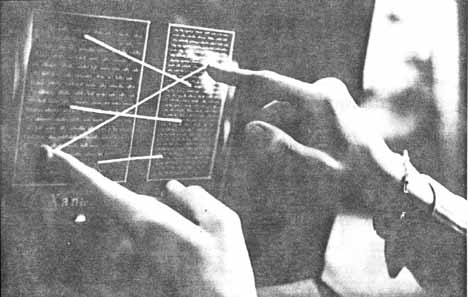
We should have had this kind of thing as a standard part of our common user-facing software by now; in all software related to reading and writing. All implemented in free software, open protocols and standards, in a distributed manner, not tied to one company or organization. In 2012, I should have been able to practically link a paragraph of my comment here to a line on a local PDF file, another paragraph on that file to a particular portion of a web video, and string a group of such links and transclusions together, comment further on them, keep them under version control, and share them with others, without being tied to a single service or application. This stuff should be infrastructure.
And this is what personal computers were supposed to be all about, before the original naive and optimistic vision of enhancing human intelligence and distributed production and sharing gave way to the current situation where personal computers are used mainly to mindlessly consume centrally produced crap. I'm still looking forward to and willing to work towards an updated variant of that vision, but it's going to be an uphill battle.