I read it about a year ago, and it was probably the single most important article I've read in my entire life.
Some background: I've been using computers since I was a little kid. Used to play videos games a whole ton. Around the age of 15, I started having severe RSI-related pain in my hands. Even after I stopped gaming, I could never get away from the keyboard and mouse, because I was a technology professional.
Fast forward 15 years. I'd been dealing with constant pain every day for as long as I could remember. My hands hurt even when I wasn't typing. It was bad enough that I was considering changing my line of work.
I'd tried every type of medical remedy under the sun. I'd seen (many) doctors, physical therapists, chiropractors, acupuncturists, etc., but I couldn't find any sort of treatment that provided anything but temporary pain relief.
Through some stroke of incredible luck, I stumbled across this article randomly while looking for something else. I read it and found Aaron's experience closely mirrored mine in a lot of ways. I immediately bought the book he recommended, started reading it on my Kindle, and began following the advice contained within.
Two weeks later, I was almost entirely pain-free. Now a year out, I can type all day without even the slightest twinge of pain. Seem too good to be true? I probably would've said the same thing if it hadn't happened to me.
I will say one thing -- I've recommended this book to a number of people at this point, but not all of them have had the same kind of result I have. I've noticed the ones who really buy into it and become convinced that their pain has a psychosomatic basis see their pain disappear. The ones who still stick to the idea their pain is caused by an previous injury or old age -- those folks don't seem to get much benefit.
Really? I haven't read the book, but I did look up a book review. Please tell me if the review is inaccurate, because... wow. I thought Freud was a little off his rocker.
Dr. Sarno's theory can be stated simply: Most muscular/ skeletel pain is usually the result of early infantile and childhood trauma which has been repressed. The emotion involved is invariably that of profound anger and rage.
So repressed childhood trauma causes RSI. I'm not saying that body pains can't be psychosomatic, but that's a heck of a conclusion there. It sounds like some serious placebo effect. I'd love to see it tested against a similar but different explanation (a belief in your brainwaves being blocked by the lizardmen who run the government, for example).
An alternative data point: I had severe RSI several years ago, to the point of thinking that I would have to stop programming professionally alltogether. What worked for me was starting to use a break program (10 seconds micro breaks every 5 minutes, exercises for a few minutes every 45 minutes) and switching to a more ergonomic keyboard and mouse. It worked well for me, and I am now completely recovered. More details in "How I Beat Repetitive Stress Injury" http://henrikwarne.com/2012/02/18/how-i-beat-rsi/
Regardless of what works - any signs of RSI should be acted on immediately! It won't get better by itself.
After using the ergonomically suicidal Apple Magic Mouse and Apple wireless keyboard, I developed RSI after just a couple of months. I having my wrists and forearms massaged every night until the tightness went away (for the night), and I switched to a mechanical keyboard, a nice-sized gaming mouse, and started mousing with my left hand at work.
I haven't had any RSI symptoms for over 2 years, and still just alternate mousing hands (left-handed at work, right-handed at home), and use a mechanical keyboard without a 10-key (keeps your mouse closer to a neutral position for your body).
Here's what I use at work, if anyone is interested:
Instead of a gaming mouse I had great success with trackballs. I have no idea why they fell out of favour - I remember them being rather popular some 10-15 years ago. Anyway, with a trackball I don't need to move my hand at all, except when switching from keyboard to mouse and back. I use this one: http://www.logitech.com/en-ca/product/trackman-marble YMMV, but I don't think I'm ever going to return to using mouse.
I have three computers on my desk with three trackballs side by side and the keyboard on a KVM switch. Well really just a "K" switch. Works pretty well for me. I use classic wired trackballs instead of your marble. I'm not happy that they're long discontinued but I stockpiled quite a few when production ended. I hate the idea of wireless, last thing I need in my life is one more thing to worry about charging to replacing batteries.
Trackballs are much faster. Given that I might switch from keyboard to trackball thousands of times per day, saving just one second by knowing where the trackball is, saves quite a bit of time. I also find it faster and more accurate for selection work to use my thumb instead of the much larger muscles used for mice.
I don't do much gui work other than clicking links in a web browser but when I do I find the trackball to be superior.
I am using a mechanical keaboard as well, and hardly have any signs of rsi. It's amazing to see professionals still using cheap and crappy keyboards as their main tool! I've invested in my computer gear, especially; good mouse, keyboard and screen (mind your eye's!).
That was something I taught myself at college (late high-school for those in the US) - I knew my career would be computer based, so forced myself to become natural using either hand for mousing. I switch every half an hour or so, and whilst my arms and shoulders aren't great, it's better than when I forget and do a full day on one hand.
Also have a mech at home, and seriously thinking about buying one out of my own cash for work (no way they're going to pay £100 for a keyboard...).
> Also have a mech at home, and seriously thinking about buying one out of my own cash for work (no way they're going to pay £100 for a keyboard...).
Work should pay £100 for a keyboard, if it's necessary for you to work healthily and safely. They spend more — often much more — than that on (for example) disabled toilets, lifts, ramps, chairs, manual handling training, first aid training, ...
> "My wrist aches when I use my mouse. How can I prevent this?"
> ... "try a different size or shape of mouse. Your employer should help by providing a range of such equipment."
I disagree. I've used all sorts of ergonomic keyboards, but always keep coming back to the quiet low-travel scissor-switch keyboards. I even went so far as to get an Apple wired keyboard for use with my Windows machine at work.
As a counterpoint, I also stumbled on to this same post at the same time as I was experiencing "RSI" (severe eye fatigue from computer use)
I bought the book immediately, which is odd for me because I am extremely skeptical but it is a pretty good indication of the dire situation I found myself in.
Within the first 20 pages I knew I had been had. The author is really proud of himself for being the only health care professional to finally connect the dots, and he takes at least the first half of the book telling as much.
Looking back at the blog post and even this comment it is weird that no one actually acknowledges the "process" or provides any sort of detail on their own situation and what really worked for them.
[...] but perhaps also the hundreds of thousands of people in the United States alone who suffer from conditions like chronic back pain, fibromyalgia, chronic pelvic pain, tinnitus, temporomandibular joint disorder, or repetitive strain injury, where, typically, no amount of imaging, nerve testing, or surgery manages to uncover an anatomical explanation. [...]
I read a similar comment on Slashdot.org about 11 years ago when I was suffering from terrible wrist pain, hand numbness, etc. Here is additional information on the Sarno mind body approach to curing RSI:
I am 11 years free of any wrist pain. I use a cheap crappy keyboard that came with an old Dell computer and a normal mouse to program about 60 hours per week.
Seconded. I am grateful to Aaron Iba for posting his article (http://aaroniba.net/articles/tmp/how-i-cured-my-rsi-pain.htm...). I had similar experiences, and thanks to him my (severe) RSI problems are a thing of the past. There was a time when I was reduced to dictating and using touch-only keyboards (by FingerWorks) or ergonomic keyboards, and even that for a limited number of hours per day. These days I can type on anything, in any position, for any amount of time.
Let's expand on the psychosomatic illnesses a little. Now (several years later) I know that there are a number of symptoms that are caused by my mind. I know when to expect them, I can make a pretty good guess whether a given problem is mind-caused or not. What I can't do is cure them completely, still working on that. But I do know that Sarno is right.
Now, before you hit "reply" and go all-scientific, think for a moment. The problem we have is that we don't have ways to "measure" the mind. You can't easily just form control groups and do clinical trials. What works for one person might not work for another. So I can understand why doctors would rather stay away from the subject and pretend that the body and the mind are entirely separate (which is actually demonstrably untrue). They can't do anything else, as a doctor is sworn to only use scientifically-proven methods.
I see this discussion come up regularly. There are usually two groups that form: people who managed to deal with their illnesses and people who say that all this psychosomatic illnesses talk is hogwash. I am in the former group and I am worried that the latter group prevents many people from healing. So, if you suffer from things like RSI, joint or tendon pain, back pain, muscle pain, jaw pain, frequent sore throat (yes), frequent sinus/nasal infections (yes), at the very least do yourself a favor and read one of Sarno's books. I'd also suggest other sources, but I simply don't know of any, except an increasing number of studies that show that we don't understand the "placebo effect" and that the mind has much more to do with physical health than was previously thought.
Obviously, nobody suggests that any illness can be cured just by reading a book or thinking about it. There are certain physiological aspects of your body that your mind can influence and some that it can't. From what I observed myself, the two main "tools" are changing muscle tension and restricting blood flow.
And finally: nobody (least of all Sarno) is saying that you should avoid talking to doctors. The first step is always to seek medical help and eliminate any physical cause. What should alarm you is when after multiple visits to doctors you're not getting any closer to curing the problem. Unfortunately, very few doctors will tell you clearly that they have no idea what is going on, so you have to listen and think. If you're doing test after test, if your doctors say "well, let's try [medication name here]", the problem you are observing might be the symptom, not the cause.
Couldn't symptoms be treated by increasing blood flow with exercise or stretching, for example? If stress is a cause, wouldn't it be relieved by reducing symptoms?
Recently I've had RSI and been having physio. My physiotherapist seems to be very experienced and pretty much right about everything. Here's what she told me:
1. Fix your posture.
2. Use ergonomic devices.
3. Exercise to strengthen your core and back muscles, and counteract your sedentary lifestyle.
Details below.
1. Posture
The main cause of RSI is bad posture at the desk. Both the way you type and use the mouse, but importantly also the way you sit.
There's little point treating the symptoms if you don't treat the cause. Looking around my workplace, I see pretty much no-one in the correct posture.
- The back of your chair should be in contact with your back, i.e. actually touching it at all times.
- You should be right under the desk. If your chair has arm rests that stop you from getting under the desk, get a new chair.
- Top of screen at eye-level (most people have this spot on).
- Keyboard a little back from the edge of the desk.
- Elbows at approximately 90 degrees
- your wrists should not be at an awkward angle as they approach the keyboard.
2. Ergonomic devices
Get a good sized keyboard. Don't use awkward keyboard shortcuts, e.g. alt-tabbing on a Mac running virtual box requires your left thumb to reach underneath the other fingers. This is bad. Re-map common shortcuts or use two hands.
Get a mouse that has a natural (hand-shake/vertical) grip. e.g.
I also had RSI which progressed to the point where I was starting to worry if I'd be able to keep using a keyboard at all. A standing desk had helped for some time, but it was reaching the point where I'd stand for 3/4ths of the day, come home, and simply lie down.
I went to physical therapy, which identified problems with my neck and shoulders, and then we began working on those muscle groups and some of my core. I should note that these exercises were very gradual, such as using no weights or 1-2lb weights -- I didn't go straight to lifting!
After a few months of this, most of my symptoms have disappeared (I only went to phys therapy for about 1.5 months; afterwards I was able to keep doing the exercises at home). Also, my wife has noticed that my posture has naturally improved as a result of the exercises, such as my shoulders no longer rolling inwards.
I still have some remaining long term problems that I've had for a decade, but now I can sit and use a computer the whole day with very few problems. Of course, everybody's situation is different: physical therapy, surgery, and "The Mindbody Prescription" mentioned elsewhere have not helped a friend of mine. But at least in my case, it was a bit humbling to realize that all I really needed to do was exercise (and I'm not overweight, either).
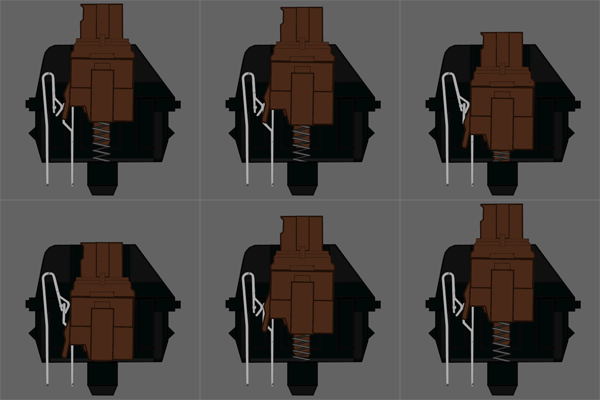
Something else that helped me was getting a quality mechanical keyboard with low actuation and learning how to use it without bottoming out. The model that I like (CM Storm Quickfire Rapid) is unfortunately no longer made, but it uses Cherry MX Brown switches (not loud, but still has an actuation point) and has no numeric keypad, so I can keep the mouse close by without having to stretch my shoulder. I use blue switches at home, which have a more clear actuation point and thus are probably better for a mechanical keyboard novice, but they are probably too loud to use in an open office environment. This guide is very helpful for understanding the how & why of mechanical keyboards: http://www.overclock.net/t/491752/official-mechanical-keyboa...
I'm currently trying to solve my RSI problems by going farther than the normal progression of ergonomic peripherals. If that doesn't work, I'll have to give up and go to voice control.
I've designed and built my own chording keyboard, which should be 10x less stressful to type on than a normal keyboard. I also have an eye tracker that I'm going to program to use to replace most mouse tasks.
I don't like the idea of inaccurate input that makes noise (me speaking) that could disturb others in an office. I have a feeling that being too noisy for an open-concept office might limit my career options in the future. But I would still rather live with that than live with RSIs.
I do really like the idea of running Windows in a VM and proxying the commands to linux. That was previously one of my qualms with voice control: that I'd have to switch to Windows.
My other idea is to switch to a mass-motor gesture and eye-tracking based system using an Oculus Rift with an IR camera mounted in an eye socket. That might be an interesting and fun way of programming even if it wasn't to solve an RSI problem.
I'm fortunate that I've never had rsi despite my extreme computer usage, but I'm interested in the possibilities of eye tracking for interfaces. Is it accurate enough? One simple thing that would come very handy is widget focus switching, maybe in combination with some key combo, "switch focus to where I'm looking" - that would save me a lot of reaching for the mouse.
At least at this point it's accurate to about a palm sized region, and there is a cool auto scroll demo. But getting together UI and making it useable is a pretty big project.
That's not great but it would be acceptable to switch focus between screens (or big enough tiles in a tiled desktop). Together with some clever mechanisms one could define task/tab/window groups per area and make switching much more manageable for large amounts of elements without having to surrender to "pick the mouse"-"select"-"back to the kb".
With a nice microphone I have found that I can speak rather quietly and have it still pickup my commands accurately. My office mate has said it doesn't bother him much.
this is all I think of when I think about programming by voice: https://www.youtube.com/watch?v=KyLqUf4cdwc I remember laughing so hard the first time I saw this. (granted its from vista, and I know voice has come a long way since then)
However I could see myself using voice commands that activate Macros or other actions. I just bought a Nexus9 and am going to try to use it for coding, I can definitely see potentially using voice commands to augment that workflow.
Here is a rather conventional setup with which I completely got rid of my RSI:
1) Kinesis Freestyle2 keyboard
2) mouse that fits my hands (razr doesn't)
3) listening to the body (!)
4) stretching (especially in the morning)
5) Lots of physical exercise / gym / swimming
6) speech recognition for all text (emails+code comments)
I find it hard to believe that it can be cured simply by changing your mind, but knowing that there are cures certainly helps.
Almost forgot the most important part: a good chair. No slouching! Ever! This is more against upper back pain, but I guess neck tension is related to arm pain.
This is one of the best reasons for me to have a startup: to be able to work when and only when my body tells me that it's okay.
I had a brief period of RSI while playing video games in my teens and forced myself to switch to Colemak as a Microsoft-style "natural" keyboard wasn't enough. The Colemak did the trick, until 2 years ago when I suddenly had terrible pain in my fingers and wrists for about two weeks. It eventually disappeared as I began to learn how to use an Kinesis keyboard and experimented with an RF-based Evoluent VerticalMouse 4 or a Kensington SlimBlade Trackball. Adjusting my chair and posture helped enormously also. I eventually discovered the source of the mysterious pain when I tried to solve a Rubik's Cube and it flared up again. Turns out, I'd spent the weekend before my 2 weeks of misery at a hackathon that featured Rubik's Cubes also and I'd spent time learning how to solve one. I do really want to experiment with voice, but these darn open concept offices ... As for gestures, Kinect might come in handy, it also does voice and can focus on one person of many for voice recognition. But I'd almost rather learn a custom, chorded ten-key keyboard than speak every semicolon ... Oh and the trick with the Cherry MX blue "clicky" keyboards is that you don't actually have to press as hard as people normally push the keys. Pressing harder strains your hands further, so the audible and tactile "click" feedback helps train your fingers to not push as hard -- at least, that's my two cents on them. I like it, but not enough to switch from a nicer, concave layout like the Kinesis. Makes a good backup keyboard though, as I can't afford two concave keyboards.
Watching the PyCon talk the author mentions as inspiration, the thing that seems like it would really kill this for me (even given a good macro set for the editors and applications I need) is the input lag. The whole time, it seems like he's either pausing between commands and able to react to incorrectly interpreted input, or he's speaking a long string of commands and something goes wrong in the middle that invalidates the remainder of his sentence (he ends up in the wrong mode, or in the wrong pane, or something along those lines).
The huge advantage that the keyboard has as an input device is that there's zero delay-- if I make a mistake, I can go back and fix it as soon as I'm able to see and react to it. Speech recognition has this inherent delay to it-- it has to delay execution of a command until it's concluded that there's no other possible interpretation of what you just tried to say. Speech is a lot slower than I can react-- the inherent lag there just seems intolerable.
I suppose one could get used to it if it came down to "use speech recognition or find another job", though.
Yeah, it's pretty common for someone to explain why the keyboard is a better input method. And you're right it probably is at this time for healthy developers. However, you should probably stop to consider that the solution isn't for you. It's for people who can't type. Many people have disabilities, for example. This opens up a new world to them. And as for the author, he suffers from RSI, as do many other developers.
Like the author of the article, I've been making the switch to programming by voice. At first, the delay was really jarring, but you get used to it.
You're also completely correct about how when you speak a chain of commands, one of the commands in the middle getting messed up can invalidate the rest. That happens a lot. You learn to speak in shorter chains, and also to make the commands phonetically distinct.
That said, both the delay and the inaccuracy problems can be greatly ameliorated by a fast CPU and a good sound card. I don't have any benchmarks, but I have noticed the difference since upgrading.
I know someone who does a lot of voice input, he tends to use simple sounds that are distinct as a trained syntax... like: "woof" for moving to the end of a line, and "bark" for moving back.. and other words/sounds that aren't common in conversation... he said it took some getting used to but the accuracy got a lot better.
I use the word "bark" too, albeit for a different purpose. I think that sort of spec selection is just a habit that you naturally get into when creating a lot of voice commands.
Incidentally, I've learned a bit of Korean, and it's caused me to notice that Dragon recognizes words which don't end in multiple unvoiced consonants more easily than those that do. (For example, "taze" is better than "taste" and "pad" is better than "pact".)
Yes, there is a little lag but I have not found it to be a big deal. If you are getting excessive lag just make sure that the environment is mostly quiet and you have given the Windows VM enough CPU and RAM. Turns out voice recognition is hard.
Corrections on a keyboard can actually be ahead of when you see them - particularly during laggy SSH sessions - when you realize you've struck a key incorrectly a tiny moment after doing so, and hit backspace quickly.
Great article! I have wondered if this was possible before. The only problem is eventually you might lose your voice!
I had hand/arm problems not long after starting my first programming job, but I have solved them now.
My main advice would be to get a good chair and desk. I have a RH logic 400 chair and height adjustable desk, with an Imprint Cumulus Pro floor mat. I also use a Kinesis Freestyle 2 keyboard. All together this cost about £1700, but it was absolutely worth it. I spend approx 50% of my time standing which I find much more comfortable than sitting.
My other piece of advice would be to take regular breaks. I recently became self employed which allows me to intermingle work with exercise, socialising and eating as I want. This really helps with fatigue. At least try to take a short break once an hour. I found jawbone up good for this as you can set it to vibrate after you have been sat idly for too long.
Finally, if using the mouse is a problem, learn to use your non-dominant hand. This has pretty much solved my problems with my mouse hand.
Regarding the first line of this comment, though voice strain is something to look out for, if you speak correctly[1], you can minimize your chances of damaging your voice.
I mentioned this in an earlier comment as well; using a good microphone I can speak very softly and still have my commands heard accurately. Additionally I take a drink of water whenever WorkRave tells me to take a break (every 3 minutes). Haven't had any trouble with voice at all.
FWIW switching to the Dvorak layout was the best thing I ever did. Not only did my fingers stop hurting, I could actually type faster than I had before. And it only took a weekend to make the transition.
Also, choose a keyboard that works for you. Different people have different opinions; the one I use was a $3 no-name one, but it felt right.
I also recommend Dvorak. I doubt it solves all problems, but I feel it significantly increases the time I can spend typing compared to with Qwerty, much beyond what I do for 99% of the year.
Easily overlooked is using the shift, control and alt keys correctly. It's left-control + backspace, right-shift + 1, right-alt+F4 (to pick examples that work on Qwerty and Dvorak). Otherwise you're still stretching.
A USB touchpad is a zero force mouse substitute, though a little annoying for positioning; I ended up using one for clicking in combination with an optical mouse for positioning. Has anyone yet released a mouse with zero force clicks? Microsoft released one with zero force for half a dozen useless functions, annoyingly, everything except left and right clicks.
Very interesting. Not sure if I could live with the input lag myself, however.
I've been a full time developer since 1998 or thereabouts, but have been coding since I was a child. Early on when I started working full time I found myself quickly getting RSI fatigue and tingling symptoms. I switched to a Microsoft ergonomic keyboard and various trackballs; this greatly ameliorated the growing pain.
In the past few years, however, I've made the switch to gaming grade laser mice (e.g. the Logitech G9X) and have almost no issues. The high sensitivity and precision these allow for at high DPI settings are great vs RSI. Furthermore, since a shoulder fracture earlier this year (now healed) when I was forced to use only mainly left arm for some time, I've kept up the use of left hand mouse. At clients I'll have it on left hand side, at home office on the right hand side. I believe ambidextrous use of the mouse has a lot of benefits, spreading the effort level being the biggest of them.
For keyboards, I touch type and made the switch to mechanical keyboards (Logitech G710+ with O ring dampened MX Browns) around 1.5 years ago - I'm not getting any additional pain as a result. I am however kind of interested in getting a more ergonomic mechanical keyboard for use at client spaces, to preemptively combat the RSI risk. Was held off by the cost, however I guess this means I'll be reading reviews of the TEK vs the Kinesis Advantage again shortly. ;)
As a related issue, I believe back pain is just as critical as RSI. The only way for myself to combat this is through consistently exercising. I ride 100-150km per week, mainly commuting but also MTB XC single trails whenever time permits, and try to get my deep squats, deadlifts, shoulder presses and bench presses done 1-2 times per week at gym. Only riding isn't enough; I find the gym work essential for fighting back pain, no matter what kind of chair I use - which happens to be a Herman Miller Aeron at home, and some random chair at work.
Long post, sorry. My final comment / tip will be to set up JustGetFlux for those late night coding sessions. I'll leave it at that. :)
My wrist pain is so bad I've had to change profession. Nevertheless, computers are used in every job. At first, ergonomic keyboards and mice were enough. Then any kind of mice was too painful. Then I became fully ambidextrous, writing and using mice with left hand. After I maxed out the pain in that hand, I've moved onto tablets. I find almost no pain typing on a Swype keyboard on my tablet.
I got Samsung Note 12.2 2014 pro because it has a huge screen. If I need to do a small amount of programming, I use Splashtop to accept Swype input into my Windows laptop just across the room.
If anyone has better ideas for an extreme case of RSI, please let me know. Thanks.
Not as bad as you describe but there was a period when I used to click a lot (in a game) for many hours a day until it became painful. I used AutoHotkey to remap Ctrl and Alt to left and right click respectively and that was it. I'm not saying it's enough but it may help.
Despite my extreme (32 year long) computer use, I only had RSI symptoms when using a mouse and under stress. Since I use my macbook trackpad and have no stress, I can sit in any position for any time and do anything and have 0 symptoms. I am very interested in coding without keyboards etc because these days I happen to think a lot more about my code before trying it and that means I walk around a lot; sitting down or walking to my standing desk both seem cumbersome.
Are you a home-row typist? I am not (my hands float freely above the keyboard, generally angled with respect to it, so my wrists are not bent), and I attribute my 23 years of RSI-free near-daily computer use to being home-row-free.
(Albeit, like you, mice started giving me trouble after about 8 years of mousing. The problem was gripping while moving the wrist. Solution? Trackball.)
(EDIT: Tangentially, I keep my eyes in shape with "preventative" eyewear: I don a pair of (weak) reading glasses ~33% of the day to shift the focal point of my monitor further away. Keeps eye strain at bay.)
Thanks for posting this. I've had a long standing tendency to get eyestrain headaches from the computer screen, and when I was writing my dissertation, my wrists hurt so bad that I couldn't finish my figures. Fortunately, an old draftsman helped me out using pen and ink.
Today, as a musician, I'm quite conscious of the health of my hands and wrists. When I hear musicians complain about wrist pain, I always tell them to evaluate their computer use.
I started setting up Aenea back in April and got distracted with porting the OS X server to the newest version of the client. Now that there's a working server, I'll have to give it another shot.
In the interval, I switched to a standing desk and it did _amazing_ things for my hands. I tend to slouch when sitting, and just standing while I worked for several periods a day reduced the pain a lot.
This was a pretty interesting read. One thing I can recommend for those with RSI are Cherry MX Blue switch keyboards.
As someone with fairly severe RSI, making the change from my normal rubber-dome keyboard over to the Blue Cherry MX switches about 2 years ago has made things significantly better. The pain and discomfort is largely gone-- its still there, of course, but its hardly noticeable.
I'm beginning to have some carpal tunnel pain brought on by heavy keyboard/phone use and my weight lifting regimen. What is it about the Cherry MX blue switch keyboards (http://www.newegg.com/Product/Product.aspx?Item=N82E16823201...) that helps with RSI? Just looking at it, it appears like it would be even harder on my wrists.
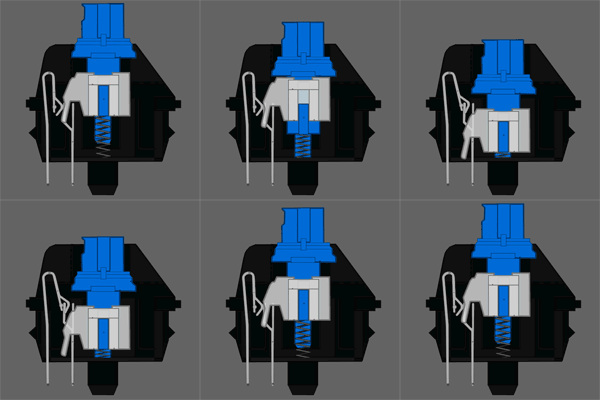
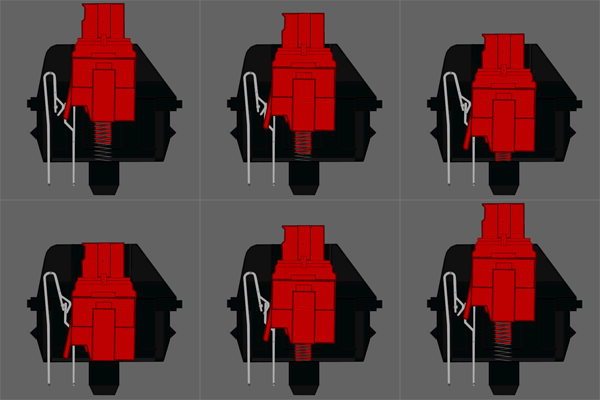
A "rubber dome" or membrane keyboard requires the typer to press the dome all the way down to trigger the key press. On a mechanical keyboard, it is a mechanical switch to trigger the keypress. On Cherry MX blacks greens and reds, there is no feedback when you have pressed the key. However on a blue or a brown there is a tactile "bump" when the press is registered. Critically this happens before the key "bottoms out" or hits the bottom of the switch groove, so you can release the key before that second strike occurs on your fingertip. With the blues, the "activation point" as it's called makes a loud click as well as the tactile bump, so as you get used to typing on them, you'll release right after the click.
I'm not sure of the effects of mechanical keyboards with regard to RSI, but if you're a hard typer, they might help train your hands to not bottom out the keys.
The pressure curve and click placement on Cherry MX blues are generally conducive to learning to not bottom out on the keys and apply the proper amount of pressure to the key.
Bottoming out on the keys and using excessive force because of a lack of tactile feedback on the keypress are leading causes of injuries, because they provide a sudden jolt (when the key stops moving, but your finger doesn't) and unnecessary strain (to generate the extra force). Bottoming out in particular is bad, because you end up momentarily pressing against the keyboard frame with the full force you pressed down on the key, doing nothing but straining your wrist, while if you stop the downstroking on a spring loaded key before bottoming out, you'll end up stopping your motion in a cushioned manner (and the key assists a little bit in retraction).
I'm not sure that I really agree that a good mechanical keyboard is better than a good rubber dome keyboard for people with RSI. The key word there is "good."
The thing about rubber dome keyboards is that they are the cheapest kind of keyboard. So you'll find a lot of absolutely awful ones out there. For example, you'll find ones where the amount of force you need to push in the key is unpredictable (keys feel "sticky"). You'll find ones where it takes too much time for the keys to come back up after they're pushed down. You'll find keyboards that have almost no weight, so you can't type without moving around the keyboard.
In contrast, people pay $100-$200 for a mechanical keyboard (they are a specialty item) and the build quality reflects that. For that money, you usually get something which has a weight in it (so it doesn't feel like you're typing on a hollow plastic shell), has reasonable ergonomics, and key action that is at least tolerable.
I find that I am a heavy typer (I press the keys hard) and I could never get used to mechanical keyboards. I was always "bottoming out." Unfortunately, the hard stop on a mechanical is even harder than the hard stop on a rubber dome. It's like hitting a wall. There are mods you can make to mechanicals to fix this, but you have to do it yourself. (For example, you can put rubber bands underneath each key, to get a more gradual stop when you bottom out.)
Right now I use a good quality rubber dome keyboard with an included trackpad. I find that keeping the keyboard in the correct position on my lap is a lot easier when I don't need a keyboard tray. It really is all about ergonomics.
My advice to you would be to stop lifting weights for a while. Just use machines or something to avoid putting pressure on your wrists. And then get a good quality keyboard. You will need to try it out before you find the right one for you. You'll probably have to order a few online before you find one you like. You will also need to start using good typing posture so be sure to research that.
Thanks for the response. I actually picked up some schiek wrist wraps and they are definitely helping on the weights front. I'll look into typing postures today.
You shouldn't use wrist wraps while you're typing. They're strictly for use when you're sleeping or otherwise relaxing. There's a lot of misinformation and bogus products out there about RSI... my advice to you is to read a book by a good doctor, like Dr. Pascarelli's Complete Guide to RSI (http://www.amazon.com/Pascarellis-Complete-Repetitive-Strain...)
In my experience it's not the difficulty of the key press that is the source of the problem. For me, it's "bottoming out". Without the tactile feedback (and maybe the sound, too) it's too easy for me to press a key "too hard" when typing at full speed and have my finger brought to a full-stop hitting the bottom.
I find rotating between different types of input devices helps the most. Some weeks, I work on a laptop. Some, at a PC with a common mouse and keyboard. Some, with my Unicom and a trackball. I also change up how I sit, and the location of monitors. Any one system eventually leads to the same pain.
I can't recommend a browser extension like Vimium highly enough. It allows you to browse the web efficiently without a mouse. Also: shortcat for navigating OSX dialog boxes, and Divvy for resizing windows with the keyboard. I hardly touch the gesture pad anymore (external one), and my shoulder thanks me for it.
Has anyone tried to add gestures, with a Leap Motion for example, to their development process? A handful of subtle motions could be used to automate some repetitive tasks.
Leap Motion isn't nearly as accurate as they show in their videos. I have one and it's completely useless for anything more than a simple "swipe left" gesture.
Agreed. It seems that the Leap, being limited in its field of view, forces the design of UX utilizing it to strike a useless middle ground between broad and fine movement.
However, I've started to experiment with combining the leap with a mouse--i.e. left-hand over the leap and right-hand on the mouse--to control a single hand grabber/toucher/pointer object. I assign broad movements to the mouse and much finer movements to the Leap. It seems to work well, in much the way that arms work for large motor control and wrists work for fine motor control.
Have you tried using Dasher for extensive programming (or even regular text input)? I used it a while ago when my wrists were extra bad one day and found it to be pretty slow, and I found not being able to look at both dasher and my text at the same time to be super limiting. I can't imagine it being productive for code input, but I'd love to be wrong.


https://news.ycombinator.com/item?id=1269951
I read it about a year ago, and it was probably the single most important article I've read in my entire life.
Some background: I've been using computers since I was a little kid. Used to play videos games a whole ton. Around the age of 15, I started having severe RSI-related pain in my hands. Even after I stopped gaming, I could never get away from the keyboard and mouse, because I was a technology professional.
Fast forward 15 years. I'd been dealing with constant pain every day for as long as I could remember. My hands hurt even when I wasn't typing. It was bad enough that I was considering changing my line of work.
I'd tried every type of medical remedy under the sun. I'd seen (many) doctors, physical therapists, chiropractors, acupuncturists, etc., but I couldn't find any sort of treatment that provided anything but temporary pain relief.
Through some stroke of incredible luck, I stumbled across this article randomly while looking for something else. I read it and found Aaron's experience closely mirrored mine in a lot of ways. I immediately bought the book he recommended, started reading it on my Kindle, and began following the advice contained within.
Two weeks later, I was almost entirely pain-free. Now a year out, I can type all day without even the slightest twinge of pain. Seem too good to be true? I probably would've said the same thing if it hadn't happened to me.
I will say one thing -- I've recommended this book to a number of people at this point, but not all of them have had the same kind of result I have. I've noticed the ones who really buy into it and become convinced that their pain has a psychosomatic basis see their pain disappear. The ones who still stick to the idea their pain is caused by an previous injury or old age -- those folks don't seem to get much benefit.